
What Are Skills in Claude AI? The Complete Guide (2026)
Most people use Claude like a search engine — type a question, get an answer, repeat. I did too, until I realized I was re-explaining the same workflows every single day. Skills changed that completely. One instruction file, written once, and Claude follows your exact process every time — no reminders, no copy-paste, no starting over.
What Are Claude Skills?
Claude Skills are reusable instruction packages — folders containing a SKILL.md file with YAML frontmatter (name, description) and Markdown instructions — that teach Claude how to handle a specific class of tasks, every time, without you explaining anything.
Anthropic launched the Skills format in October 2025 and released it as an open standard (agentskills.io) in December 2025. Today the format is supported not just in Claude — it works across OpenAI Codex, Cursor, Gemini CLI, and Windsurf.
The simplest mental model: a Skill is a permanent playbook. You write it once. Claude reads it whenever relevant and does things your way — your tone, your structure, your rules — without you typing a word of setup.
What's Inside a Skill?
• SKILL.md — required: YAML frontmatter (name + description) + Markdown instructions
• scripts/ — optional: executable code for deterministic or repetitive tasks
• references/ — optional: extra docs Claude loads when needed
• assets/ — optional: templates, fonts, icons used in outputs
The description field in the frontmatter is what triggers the skill. Claude reads it and decides whether to load the full skill body. A vague description means the skill never fires. A specific, action-oriented description means Claude activates it reliably.
How Claude Decides Which Skill to Use
This is the part most guides skip, and it matters. Claude does not load every skill upfront. It uses a three-level progressive disclosure system:
1. Metadata only (name + description) — always in context, roughly 100 tokens per skill
2. Full SKILL.md body — loaded only when Claude determines this skill is relevant to your request
3. Bundled resources (scripts, references, assets) — loaded on-demand during task execution
This means skills are token-efficient. You can have dozens of skills installed and Claude only pays attention to the ones that match your current task. This is fundamentally different from stuffing everything into a system prompt.
Practical implication: if your skill never seems to trigger, the problem is almost always the description. Make it specific, action-oriented, and mention exact phrases users type — not just abstract categories.
Skills vs Prompts: The Real Difference
I see this question everywhere. Here is the clearest way I know to explain it.
A prompt is something you type each time. A skill is something Claude reads automatically. But the difference goes deeper than just saving keystrokes.
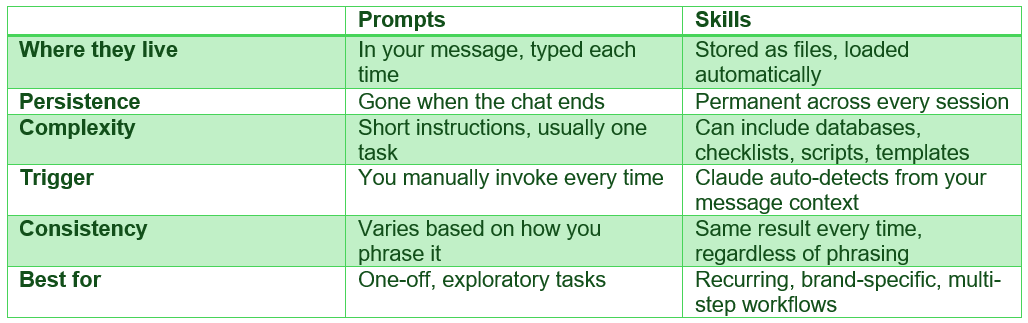
The sharpest distinction: skills are not system prompts either. A system prompt is static text loaded once at session start. A skill is a file-based module Claude discovers, evaluates for relevance, and loads dynamically — only when needed.
My take: if you have explained the same thing to Claude more than three times, it should be a skill. Full stop.
Skills vs MCP: When to Use Which
This trips up even developers. MCP (Model Context Protocol) and Skills solve different problems, and conflating them leads to overengineered setups.
The clearest framing I've found: Skills are Claude's internal playbook. MCP is Claude's nervous system connecting it to the outside world.
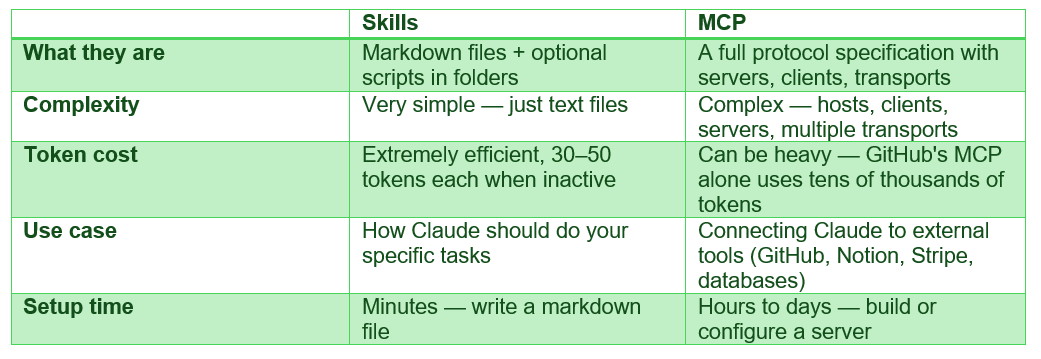
Use Skills when: you want Claude to follow your process, your brand guidelines, your output format, your workflow steps. Use MCP when: you need Claude to read live data, write to external systems, or take actions in tools like GitHub or Jira.
Most developers actually need both: 2–3 MCP servers for external integrations plus a few custom Skills for their workflow procedures. They complement each other perfectly.
Types of Skills: Anthropic Built-In vs Custom
Anthropic (Pre-built) Skills
These are Skills created and maintained by Anthropic. They're available to all users and Claude invokes them automatically when relevant. Today, Anthropic ships pre-built Skills for:
• Excel (.xlsx) — data, spreadsheets, financial models
• Word (.docx) — professional documents, reports, letters
• PowerPoint (.pptx) — slide decks, presentations
• PDF — creating, filling, and reading PDF files
• Frontend design — React components, HTML/CSS layouts
• Data analysis — charting, visualization, data processing
These are the Skills that power Claude's file creation capabilities in Claude.ai.
Custom Skills
These are Skills you or your organization create for specialized workflows. Examples of what teams are building:
• Brand style guidelines for documents and presentations
• Company email templates and communications formatting
• Meeting note structures with company-specific formats
• Task creation in Jira, Asana, or Linear following team conventions
• Blog writing with SEO rules and internal link databases (exactly what this post used)
• Code review checklists and security audit procedures
Real-World Claude Skills Examples
Let me show you what skills actually look like in practice — not abstract descriptions.
Example 1: Blog Writing Skill (What Generated This Post)
A custom skill for promptailearning.com that auto-triggers whenever a blog is requested. It contains:
• 13 phases from keyword research to quality checklist
• A full internal link database of existing posts
• Voice guidelines (banned phrases, required I-statements, hot take quota)
• SEO rules (meta title limits, FAQ structure, AEO requirements)
• Mandatory Bad Prompt / Good Prompt pairs for every example
• Auto-outputs as a .docx Word file — never plain text
Without this skill: I'd re-explain all 13 phases every single time. With it: I type 'write a blog about X' and Claude follows the full procedure automatically.
Example 2: Security Audit Skill
Skills from the community GitHub repositories include security-focused workflows: OWASP Top 10 (2025) code review checklists, static analysis with CodeQL and Semgrep, and language-specific quirk libraries for 20+ programming languages. One file. Every security review, consistent.
Example 3: The Skill Creator Skill (Meta!)
Anthropic ships a skill-creator skill — a skill for building other skills. It guides Claude through intent capture, research, SKILL.md writing, test case design, and iterative improvement. This is exactly how the skills in this guide were built.
How to Create a Claude Skill (Step by Step)
No code required for a basic skill. Here is the full process:
Step 1: Create the folder structure
my-skill/ ├── SKILL.md # required ├── references/ # optional └── assets/ # optional
Step 2: Write your SKILL.md
Every skill starts with a YAML frontmatter block, then Markdown instructions:
--- name: my-blog-writer description: Use this skill whenever the user asks to write a blog post for MyBrand.com. Triggers on any blog topic related to X, Y, Z. Always use before writing any blog content — contains mandatory SEO rules, voice guidelines, and output format requirements. --- # My Blog Writer Skill ## Step 1: Research Before writing, search for the primary keyword and collect... ## Step 2: Structure Every post must begin with this meta block... ## Step 3: Voice Rules - Write as [Name] — direct, expert, opinionated - Banned phrases: [list them] - Required elements: [list them]
Step 3: Make the description trigger-ready
This is the most critical step. The description is the ONLY thing Claude sees before deciding to load your skill. Make it:
• Specific about what triggers it (exact phrases users type)
• Clear about what it does (not just 'helps with writing')
• Slightly 'pushy' — err toward over-description, not under
• Action-oriented: 'Use this skill whenever...' not 'A skill for...'
Step 4: Test it
Install your skill in Claude.ai or Claude Code and run a few test prompts. If the skill isn't triggering, sharpen the description. If it is triggering but the output is wrong, revise the instruction body.
Step 5: Add resources if needed
For complex skills, add a references/ folder. For skills that need to execute scripts (generate files, process data), add a scripts/ folder. Keep the SKILL.md body under 500 lines — use reference files for the rest.
BAD PROMPT vs GOOD PROMPT: Skill Description
BAD PROMPT
description: A writing skill that helps Claude write better blog posts.
Why it fails: Too vague. Claude has no idea when to trigger it, and 'better blog posts' could mean anything. It will rarely activate and when it does, won't follow any specific rules.
GOOD PROMPT
description: Full-stack blog writing skill for MyBrand.com. Use this skill whenever the user asks to write, draft, create, or outline a blog post for MyBrand. Triggers on topics: AI tools, prompt engineering, ChatGPT, Claude. Also triggers when user says 'write a blog', 'create a post', or shares a topic wanting an article. Always use before writing any blog content — contains mandatory SEO rules, voice guidelines, and output format (always deliver as .docx).
Why it works: Specifies the exact site, exact trigger phrases, exact topics, and tells Claude what's inside the skill and why it matters. Claude loads this reliably.
Where to Find Claude Skills: GitHub and Marketplace
The ecosystem has grown fast. As of May 2026, there are nearly 10,000 publicly listed Claude skills across community repositories.
Official Sources
Anthropic's official skills GitHub (anthropics/skills) — the canonical reference, with skills for document creation, webapp testing, communications, and design.
Claude Help Center: What are Skills? — official documentation from Anthropic.
The Complete Guide to Building Skills for Claude (PDF) — Anthropic's in-depth builder guide.
Community Repositories
awesome-claude-skills (travisvn) — curated list of community skills, particularly for Claude Code.
awesome-claude-skills (ComposioHQ) — 1000+ production-ready skills for Claude.ai, Claude Code, Cursor, and Gemini CLI.
awesome-skills.com — visual directory of 9,950+ skills, updated daily.
Notable Community Skills Worth Installing
• obra/superpowers — Core skills library with 20+ battle-tested skills including TDD, debugging, and collaboration patterns
• trail-of-bits/security — Static analysis with CodeQL and Semgrep, OWASP audit checklists, variant analysis
• webapp-testing — Full Playwright integration for browser automation and local web app testing
• sanitize — PII detection and redaction across 15 categories, zero dependencies, fully local
• systematic-debugging — Structured bug investigation process before proposing any fixes
There is no official paid marketplace yet, but Anthropic has indicated community contributions and a formal marketplace are planned.
Frequently Asked Questions
What are Skills in Claude AI?
Skills are reusable instruction files — specifically a SKILL.md file inside a folder — that teach Claude how to handle a specific task in a repeatable way. Anthropic launched the format in October 2025. Skills load automatically when relevant, so you write the instructions once and Claude follows them every time without you explaining anything.
How does Claude know which skill to use?
Claude reads the name and description of every installed skill at the start of a session (roughly 100 tokens each). When your message matches a skill's description, Claude loads the full skill body and follows its instructions. If your skill never fires, the description is almost always the problem — make it more specific and action-oriented.
What is the difference between Claude Skills and prompts?
Prompts are typed by you each time and disappear when the chat ends. Skills are permanent files that Claude loads automatically. Skills can also contain scripts, reference databases, templates, and multi-phase workflows — far beyond what you'd include in a prompt. If you've explained the same process to Claude more than three times, it should be a skill.
What is the difference between Claude Skills and MCP?
Skills are procedural knowledge — instructions for how to complete tasks your way. MCP (Model Context Protocol) connects Claude to external tools and live data sources like GitHub, Notion, or databases. Most teams use both: Skills for workflow procedures, MCP for external integrations. Skills use 30–50 tokens when inactive; some MCP servers consume tens of thousands of tokens.
How do I create a Claude Skill?
Create a folder, add a SKILL.md file with YAML frontmatter (name + description) and Markdown instructions. The description is the trigger — make it specific. Optionally add a scripts/ folder for executable code and a references/ folder for large reference documents. Install it in Claude.ai settings or Claude Code's ~/.claude/skills/ directory.
Where can I download Claude Skills?
Anthropic's official skills are at github.com/anthropics/skills. Community skills are available at awesome-skills.com (9,950+ skills), github.com/travisvn/awesome-claude-skills, and github.com/ComposioHQ/awesome-claude-skills. There is no paid marketplace yet, but one is planned.
Do Claude Skills work in Claude Code?
Yes. Skills work identically across Claude.ai, Claude Code, and the API — write a skill once and it works everywhere. In Claude Code, skills live in ~/.claude/skills/ (user-level) or .claude/skills/ (project-level). Claude Code also supports slash commands and plugins that can bundle multiple skills together.
Are Claude Skills free?
Skills themselves are free — there is no cost beyond your existing Claude subscription. Anthropic's pre-built skills (docx, xlsx, pptx, pdf, etc.) are available to all users. Community skills from GitHub are also free to use, though some may require external services with their own costs.
Follow along on promptailearning.com for weekly guides on prompting, AI tools, and getting more out of every model.
Recommended Blogs
If you found this useful, these posts go deeper on related topics:
Best Claude AI Prompts 2026: 25+ Types With Examples