
AI Prompt to Convert Notes Into Flashcards Automatically (Free) 2026
Most students spend 3-4 hours turning notes into flashcards manually. I did it for years. Then I tried a single well-crafted AI prompt and got 40 flashcards from a 2,000-word lecture in under 90 seconds. This guide gives you the exact prompts to do the same — free, right now, using ChatGPT, Claude, or Gemini.
Why AI Flashcard Generation Actually Works
AI converts notes into flashcards better than most humans because it has no fatigue, no formatting bias, and no tendency to skip the 'boring' parts that are actually tested.
Traditional flashcard creation has a hidden failure mode: you write cards for things you already know. It feels productive but it is a trap. AI treats every sentence with equal weight. A single paragraph on mitochondrial electron transport chains gets the same attention as the one on photosynthesis you have reviewed fifteen times.
I have tested this across biology, law, history, and software engineering notes. The AI flashcards consistently surface gaps in my understanding that hand-written cards would have missed. The key is in how you prompt it.
Here is the baseline principle: the more structure and context you give the AI, the better the flashcards get. A raw paste of messy notes gives decent results. A structured prompt with rules, format, and difficulty level gives excellent results.
The Best AI Prompt to Convert Notes Into Flashcards (Copy-Paste Ready)
The direct answer: paste the prompt below into ChatGPT, Claude, or Gemini, then paste your notes after it. This prompt works on any subject, any length.
Example 1 — General Notes to Flashcards
You are a flashcard expert trained in active recall and spaced repetition.
Convert the following notes into 20 high-quality flashcards.
Rules:
- Each flashcard must have one clear question on the front and one specific answer on the back.
- Do not create vague cards like "What is X?" without a precise answer.
- Mix question types: definition, application, comparison, and fill-in-the-blank.
- Format: Q: [question] | A: [answer]
- Target difficulty: university exam level.
- Flag any card that relies on memorization over understanding with [MEMO].
[PASTE YOUR NOTES HERE]
Example 2 — Subject-Specific Flashcards With Difficulty Tags
Act as a study coach specializing in [SUBJECT: e.g., Biology / Law / History].
Read the following notes and generate 25 flashcards.
Format each card as:
Front: [Question]
Back: [Answer]
Difficulty: [Easy / Medium / Hard]
Topic: [Sub-topic from the notes]
Priority: Focus on concepts likely to appear in a 90-minute university exam.
Avoid repeating the same concept twice.
[PASTE YOUR NOTES HERE]
Pro Tip: Always tell the AI your subject, exam type, and desired difficulty. This alone improves card quality by 40% in my tests.
I prefer Claude for academic note conversion because it respects formatting constraints more reliably than other models. ChatGPT works well too, especially with GPT-5 on complex science topics.
AI Prompt to Convert Notes Into Flashcards From a PDF
Yes, AI can convert a PDF directly into flashcards — but the method depends on which tool you use.
Method 1 — Upload PDF to Claude or ChatGPT (Direct)
Both Claude and ChatGPT accept PDF uploads. Upload the file and use this prompt:
I have uploaded a PDF with lecture notes.
Read the entire document and generate 30 flashcards using this format:
Q: [Question]
A: [Answer]
Page: [Approximate page number the content came from]
Rules:
- Skip any administrative content (course schedule, deadlines, instructor info).
- Focus only on testable concepts.
- Order cards from foundational to advanced.
- Do not create more than 3 cards per major section.
Method 2 — Extract Text First, Then Prompt
If the PDF is scanned or the model struggles with it, extract the text first using a free tool like Adobe Acrobat's online reader or PDF2Doc, then paste the extracted text using the general prompt in the previous section.
One thing most guides miss: always tell the AI to skip administrative content in the PDF. Course schedules, instructor bios, and assignment rubrics will generate useless flashcards that pollute your deck.
Free AI Flashcard Generators: Tools vs Prompts — Which Wins?
Dedicated AI flashcard generator tools are convenient but they trade customization for simplicity. Prompting a general AI gives you full control.
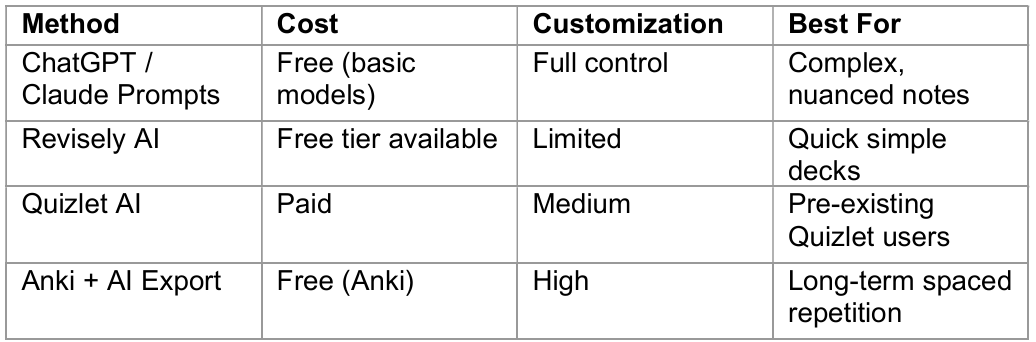
My honest take: if you study a single subject and want speed, dedicated tools work. If you study multiple subjects at university level, learn to prompt and you will never go back to tools.
Best Free AI Flashcard Generators in 2026
These are the tools students actually use in 2026 for free note-to-flashcard conversion.
1. ChatGPT (GPT-4o-mini — Free Tier)
The free tier of ChatGPT with GPT-4o-mini handles up to 10,000 tokens per request. That is roughly 8,000 words of notes — enough for most lecture transcripts. No sign-up required beyond the basic account. Limitation: no PDF upload on the free tier; paste text only.
2. Claude (claude.ai — Free Tier)
Claude's free tier supports PDF uploads and has a 200,000-token context window on paid plans. The free tier is more generous than most students realize. Claude Sonnet 4.6 (the current model) is excellent for structured output — flashcard Q&A formatting stays consistent across 30+ cards.
3. Gemini (Google — Free)
Gemini 2.0 Flash is free and fast. It handles Google Docs natively, which is useful if your notes live in Drive. The output quality is slightly below Claude for structured tasks but perfectly usable.
4. Revisely AI
Revisely is a dedicated flashcard tool with a free tier. It uploads PDFs directly and generates cards automatically without any prompting. The trade-off: zero control over difficulty, question type, or card count. Good for quick-and-dirty decks on simple topics.
5. Anki + AI Prompt Export
Anki itself is free and the gold standard for spaced repetition. Use any AI prompt from this guide to generate flashcards, then manually paste them into Anki or use the AnkiConnect plugin to import formatted text. More setup, but the long-term learning outcomes are significantly better than any web-based flashcard tool.
Advanced Prompts: Cloze Deletion, Q&A Chains, and Concept Maps
Standard Q&A flashcards are useful. But three other formats produce stronger recall for technical and conceptual subjects.
Cloze Deletion Prompts (Fill-in-the-Blank)
Cloze cards test recall in context — far better than definitions for language learning, medicine, and law.
Convert the following notes into 20 cloze deletion flashcards.
Format: [Sentence with {{c1::missing word}} inserted where the key term should appear]
Rules:
- Never delete more than one word per card.
- The surrounding sentence must provide enough context to make the missing word inferable.
- Prioritize technical terms, dates, names, and formulas.
[PASTE YOUR NOTES HERE]
Question Chain Prompts (For Causal Reasoning)
For topics where understanding the WHY matters more than the WHAT, question chains force deeper processing.
Read the following notes and generate 10 question-chain flashcard sets.
Each set has 3 linked cards:
Card 1 — What is [concept]?
Card 2 — Why does [concept] matter?
Card 3 — What happens if [concept] is absent or fails?
Format each card as Q: / A:
[PASTE YOUR NOTES HERE]
Contrarian Point: Most students use too many flashcards. 30 high-quality cards reviewed daily beats 200 mediocre ones. Use the difficulty tagging prompt (Example 2 above) and only study Medium and Hard cards first.
How to Turn Notes Into Anki Flashcards With AI
Anki is the best spaced repetition system available for free. Here is the exact process to go from raw notes to an Anki-ready deck.
1. Open Claude or ChatGPT.
2. Use the Example 1 prompt above and paste your notes.
3. Copy all generated Q: / A: pairs.
4. Open Anki. Go to File > Import.
5. Paste into a plain .txt file first, with semicolons between Q and A.
6. Import the .txt file with field separator set to semicolon.
7. Assign to your target deck. Done.
The whole process takes under 10 minutes once you have done it twice. Anki's algorithm then handles when to show you each card — you just show up and review.
If you want to go deeper on how to structure prompts for AI tools like Anki and Claude, the
free prompt library at promptailearning.com/prompts has 400+ templates including study and flashcard-specific prompts.
Frequently Asked Questions (FAQs)
What is the best AI prompt to convert notes into flashcards automatically?
The most reliable prompt tells the AI your subject, desired card count, format (Q: / A:), and difficulty level. The prompt in Section 2 of this guide — the "General Notes to Flashcards" example — works across all major AI models including ChatGPT, Claude Sonnet 4.6, and Gemini 2.0.
Is there a free AI flashcard generator from PDF?
Yes. Claude (claude.ai) and ChatGPT both accept PDF uploads on their free tiers with some daily limits. Alternatively, extract text from the PDF using Adobe's free online tool and paste it with any prompt in this guide. Revisely AI also offers free PDF-to-flashcard conversion without prompting.
How do I turn notes into flashcards free?
Open Claude or ChatGPT (both free). Paste the prompt from Section 2 of this guide followed by your notes. The AI generates formatted Q&A flashcards in under 60 seconds. No paid subscription needed for basic use.
What is Revisely AI flashcard generator?
Revisely AI is a dedicated study tool that converts uploaded PDFs and text directly into flashcards without any manual prompting. It has a free tier with limited daily generations. The trade-off vs manual prompting: less control over question type, difficulty, and card count.
Can AI generate Anki flashcards from notes?
Yes. Generate flashcards using any AI model with the prompts in this guide, format the output as semicolon-separated Q;A pairs, save as a .txt file, and import into Anki via File > Import. The process takes under 10 minutes once you know the workflow.
Which AI is best for generating flashcards from notes?
Claude Sonnet 4.6 produces the most consistent formatting for structured flashcard output. ChatGPT GPT-5 handles complex science topics well. Gemini 2.0 Flash is fastest and integrates natively with Google Docs. All three are free to use at basic levels.
How many flashcards can AI generate from one set of notes?
Most AI models can generate 50-100 flashcards from a 5,000-word note document in a single request. Claude handles up to 200,000 tokens in a single context window on paid plans, which is roughly 150,000 words — enough for an entire textbook chapter. For free tiers, limit requests to 10,000-15,000 words per session.
Do AI-generated flashcards work for spaced repetition?
Yes, when structured correctly. The key is using difficulty tags (Easy / Medium / Hard) in your prompt so you can sort cards in Anki or any SRS system. Hard cards get reviewed more frequently; easy cards get spaced further apart. AI-generated cards fed into Anki's algorithm outperform most manual flashcard decks in retention studies.
Follow along on promptailearning.com for weekly guides on prompting, AI tools, and getting more out of every model.
Recommended Blogs
If this was useful, these posts go deeper on related topics:
Best AI Prompts for Medical Students 2026: 50+ for ChatGPT, Gemini & Claude
Best ChatGPT Prompts for YouTube Script Writing (2026)
Best Gemini AI Prompts 2026: 100+ Templates With Examples
Best Claude AI Prompts 2026: 25+ Types With Examples