
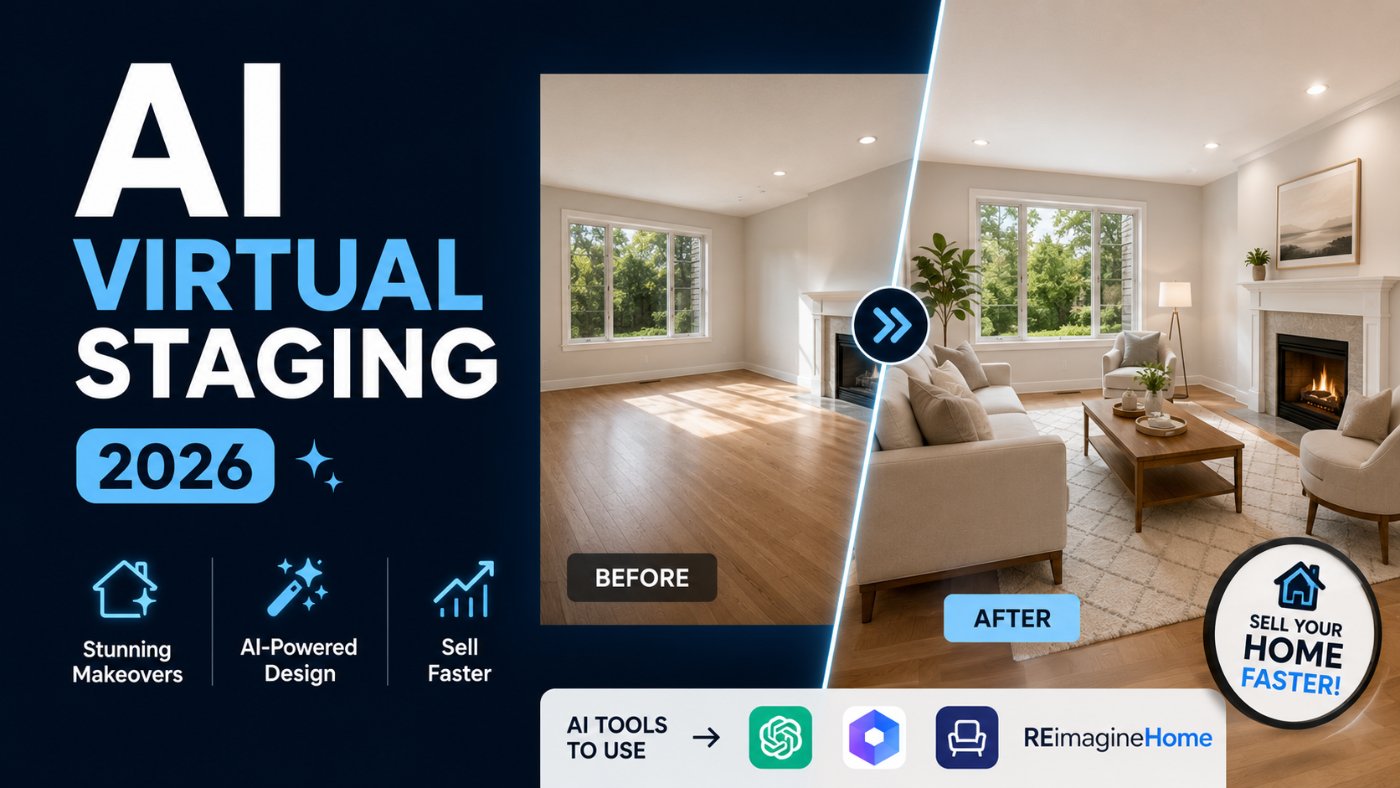
AI Virtual Staging Guide 2026: Prompts and Tools to Sell Your House Faster
A realtor friend of mine sent me two listing photos of the exact same empty living room last month, one bare, one virtually staged with a sofa, a rug, and a coffee table added by AI. The staged version got more saves and clicks within the first day than the bare listing got in a week. Empty rooms photograph like storage units. Buyers cannot picture a life in a room that looks like nobody has ever lived in it, and that is the entire reason virtual staging exists.
Why Virtual Staging Sells Houses Faster Than Empty Photos
Buyers spend a few seconds on each listing photo before deciding whether to keep scrolling or book a showing. An empty room asks the buyer to do the hardest part of the job themselves: imagine furniture, imagine scale, imagine whether their own life fits inside these walls. A staged room, even a virtually staged one, removes that mental work entirely.
My honest take here: physical staging is still the gold standard when the budget allows for it, but for most sellers and agents working with a limited marketing budget, AI virtual staging gets close enough to the same buyer psychology at a fraction of the cost and turnaround time. The furniture is not physically in the room, but the emotional response it creates in a scrolling buyer is nearly identical.
Best AI Platforms for Virtual Staging, Compared
Some platforms are built specifically for real estate staging, others are general-purpose image tools that can be prompted into doing the same job with more manual control.
ChatGPT (with image generation)
Good for quick, single-room staging previews and for generating multiple style variations of the same room fast. Less precise about matching exact room dimensions and window placement than dedicated staging tools.
Gemini
Strong for batch-editing multiple room photos with a consistent staging style applied across an entire listing, especially useful when staging a full house rather than one room.
Dedicated Staging Tools (VirtualStagingAI, ApplyDesign, BoxBrownie)
Built specifically for real estate, these tools tend to produce more photorealistic results with accurate lighting and shadow matching, since they are trained specifically on interior photography rather than general images.
Canva Magic Design
Useful for less formal listings, like rental postings or social media marketing images, where speed matters more than photorealistic precision.
My recommendation: use ChatGPT or Gemini for fast internal previews when deciding on a staging direction, then move to a dedicated staging tool for the final MLS-ready images, since lighting accuracy matters far more once the photos are public-facing.
Staging an Empty Room With AI
The biggest mistake people make here is the same one that shows up in every AI image category: a vague prompt produces a generic, catalog-style room that does not match the actual space, lighting, or proportions in the photo.
Bad Prompt (what most people type)
Add furniture to this room
Good Prompt (adds structure and context)
Using this photo of an empty living room, add a sofa, coffee table, and area rug in a modern style. Keep the room's actual proportions and lighting.
Expert Prompt (production-ready, fully specified)
Role: Act as a professional virtual staging specialist and photo editor. Task: Using the uploaded photo of an empty living room, generate a realistic virtual staging with a 3-seat sofa, a coffee table, an area rug, and one accent chair, in a modern minimalist style. Constraints: Keep the room's exact dimensions, wall color, flooring, window placement, and natural lighting direction unchanged. Furniture scale must be proportional to the visible room size. Do not add or remove any structural elements, walls, or windows. Format: One image, full room view from the same camera angle as the original photo. Tone: Photorealistic, listing-photo quality, not an illustration or rendered look.
What changed: The bad prompt gives no constraints on scale or lighting, so the model can produce furniture that looks pasted in or mismatched to the room's actual proportions. The expert prompt locks the room's real dimensions and lighting direction in place and specifies furniture scale explicitly, which is the difference between a convincing staged photo and one that looks obviously edited.
Matching Staging Style to Buyer Demographics
The staging style should match who is actually likely to buy the property, not just whatever looks trendy. A downtown studio condo staged like a family farmhouse confuses the buyer's sense of who this home is for.
Bad Prompt
Stage this room nicely
Good Prompt
Stage this living room in a style that would appeal to first-time buyers in their late 20s and 30s, using a modern, minimal aesthetic.
Expert Prompt
Role: Act as a real estate staging consultant with expertise in buyer psychology. Task: Using the uploaded photo, stage this living room in a style targeted at first-time buyers in their late 20s to 30s, likely purchasing their first condo or starter home. Constraints: Use a modern, minimal aesthetic with neutral tones, avoid overly formal or dated furniture styles, and keep the room's exact proportions and lighting unchanged. Include no more than 4 furniture pieces to avoid making the room look smaller than it is. Format: One image, full room view from the same camera angle as the original photo. Tone: Photorealistic, aspirational but approachable, not luxury-showroom style.
What changed: The expert prompt ties the staging decision to a specific buyer demographic and caps the furniture count, which prevents the common mistake of overstaging a small room and making it feel cramped instead of aspirational.
Removing Clutter and Repairs Before Staging
Virtual staging works best on a clean slate. If a room has visible clutter, damaged walls, or an outdated fixture, address that first, either with the AI or with the actual photo editing, before adding furniture on top of a problem.
Bad Prompt
Make this room look better
Good Prompt
Remove the clutter and wall damage from this room photo, and repaint the wall a neutral white, before I add furniture.
Expert Prompt
Role: Act as a professional real estate photo editor. Task: Using the uploaded photo, remove visible clutter, personal items, and the wall damage near the window. Repaint the wall in a neutral warm white. Constraints: Do not alter the room's structure, flooring, window placement, or lighting direction. This edit should only remove distracting elements and correct the wall color, not add furniture yet. Format: One image, same camera angle as the original photo. Tone: Photorealistic, clean and neutral, ready for a staging pass afterward.
What changed: The expert prompt separates the cleanup step from the staging step entirely, which produces a cleaner base image and avoids the AI trying to simultaneously fix a wall and place furniture in the same generation, a combination that tends to produce less accurate results in both areas.
The Disclosure Rule Nobody Talks About
This is the part most virtual staging content skips, and it matters more than any prompt in this guide. Most MLS systems and real estate boards require listings to disclose when a photo has been virtually staged, since an unstaged buyer walking into an empty room after seeing a furnished photo online can be considered misleading marketing.
Check your local MLS and real estate board guidelines before publishing virtually staged photos, and add a clear disclosure such as "virtually staged" directly on the image or in the listing description. This is not optional in most markets, and skipping it can create real legal and professional liability for the listing agent.
I keep this staging prompt set saved in the free prompt library so I am not rebuilding the constraints from scratch for every new listing.
Copy-Paste Template: Virtual Staging Prompt
Use this exactly as written. Replace the [brackets] with your specifics.
Role: Act as a professional virtual staging specialist and photo editor.
Task: Using the uploaded photo of an empty [ROOM TYPE], generate a realistic virtual staging with [FURNITURE LIST, e.g. "a sofa, coffee table, and area rug"], in a [STYLE, e.g. "modern minimalist"] style targeted at [BUYER DEMOGRAPHIC, e.g. "first-time buyers in their late 20s"].
Constraints: Keep the room's exact dimensions, wall color, flooring, window placement, and natural lighting direction unchanged. Furniture scale must be proportional to the visible room size. Do not add or remove any structural elements.
Format: One image, full room view from the same camera angle as the original photo.
Tone: Photorealistic, listing-photo quality, not an illustration or rendered look.
-- Role: Virtual staging specialist and photo editor
-- Task: Realistic room staging matched to buyer demographic
-- Format: Single image, original camera angle preserved
-- Constraints: Preserve real room dimensions, lighting, and structure
-- Tone: Photorealistic, listing-ready, not illustrated Reminder: Disclose "virtually staged" on the image or listing per your local MLS guidelines.
Save this to your prompt library at promptailearning.com/prompts.
Prompt Glossary
Virtual staging: The process of digitally adding furniture and decor to photos of an empty or under-furnished room, typically using AI image editing tools.
Image-to-image editing: A technique where the AI edits an uploaded photo rather than generating a new image from scratch, which is what makes realistic virtual staging possible.
Constraint stacking: Listing multiple specific rules, such as preserving room dimensions, lighting, and structure, in a single prompt so the model does not drift from the original photo.
MLS disclosure: A requirement in most real estate markets to clearly label virtually staged photos as such, distinguishing them from photos of the property's actual current condition.
System Prompt: Instructions given to the AI before your actual request, used here to define the "Role" that anchors the entire response, such as virtual staging specialist or real estate photo editor.
Recommended Blogs
If you found this useful, these posts go deeper on related topics:
● Best ChatGPT Prompts 2026: 200+ With Real Examples
● Best Gemini AI Prompts 2026: 100+ Templates With Examples
● What is Prompt Engineering?
Frequently Asked Questions
Does AI virtual staging actually help sell houses faster?
Yes, generally. Staged listings, including virtually staged ones, tend to attract more clicks and showings than empty room photos, since buyers find it easier to picture living in a furnished space than an empty one.
Is AI virtual staging legal to use in real estate listings?
Yes, but most MLS systems and real estate boards require a clear disclosure that the photo has been virtually staged, since presenting a staged photo as the property's actual current condition can be considered misleading.
Which AI tool gives the most realistic virtual staging results?
Dedicated staging tools built specifically for real estate photography tend to produce the most photorealistic lighting and shadow matching, while ChatGPT and Gemini are useful for fast style previews before committing to a final tool.
Can I use ChatGPT to virtually stage a room?
Yes, if you upload a clear photo of the empty room and use a detailed prompt that specifies furniture, style, and instructs the model to preserve the room's actual dimensions and lighting, as shown in the Expert Prompt examples above.
Should virtual staging match the buyer's likely age group?
Yes. Matching the staging style to the likely buyer demographic, such as a modern minimal look for first-time buyers versus a more formal style for a luxury family home, tends to create a stronger emotional connection with the target audience.
How many furniture pieces should be added when staging a small room?
Fewer is generally better in a small room. Overstaging with too many pieces can make a room look smaller and more cluttered rather than more livable, so capping the furniture count is a common professional constraint.
Can AI remove clutter and damage before staging a room?
Yes, but it works best as a separate step before staging. Asking the AI to clean up clutter or repair wall damage first, then stage the room in a second pass, tends to produce more accurate results in both steps.
What should be included in a virtual staging disclosure?
A clear label such as "virtually staged" directly on the image or in the listing description, following the specific requirements of your local MLS or real estate board.
Save your favorite prompt from this post to the free prompt library so your next listing gets staged and disclosed properly in minutes.