
Trending Instagram AI Photo Editing Prompts (2026)
In 2023, an Instagram aesthetic took a photographer, a ring light, and three hours of editing. In 2024, it took a filter app and a subscription. In 2025, it took one prompt typed into Gemini. In 2026, I'm watching the same handful of prompt structures get reused across millions of posts, and most people still don't know why some of them work and some of them produce a plastic-looking mess.
How These Prompts Actually Work
Every prompt in this guide follows the same job: describe the subject, the lighting, the background, and the camera mood in enough detail that the AI model has nothing left to guess. I'm going to give you a paste-in spot for your photo and a ready-made prompt right under it, so you can build your own version of this post as a working template.
Two models dominate this trend right now. Google's Gemini 2.5 Flash Image, nicknamed "Nano Banana," handles image-to-image edits and keeps a person's face consistent across styles. ChatGPT's image tool (built on GPT-4o-class image generation) does the same job with a slightly more painterly finish. Both take an uploaded photo plus a text prompt and return an edited version.
• Upload a clear, well-lit photo. Front-facing portraits work best for face-preservation prompts.
• Paste the prompt exactly as written. Don't shorten it, the detail is the point.
• If the first result looks off, add one line: "Keep the face, skin tone, and proportions identical to the uploaded photo."
If you want a deeper library beyond this post, I've put together a
If you want a deeper library beyond this post, the free prompt library has 400+ templates across every category, including image prompts.
1. The Instagram Flash Filter (Paparazzi Look)
The flash filter prompt recreates the harsh, direct-flash look of a 2000s point-and-shoot camera, the single biggest aesthetic shift on Instagram this year according to the trend data I'm seeing across creator accounts. It works by forcing strong highlights on the subject, deep background shadows, and a slight grain overlay.
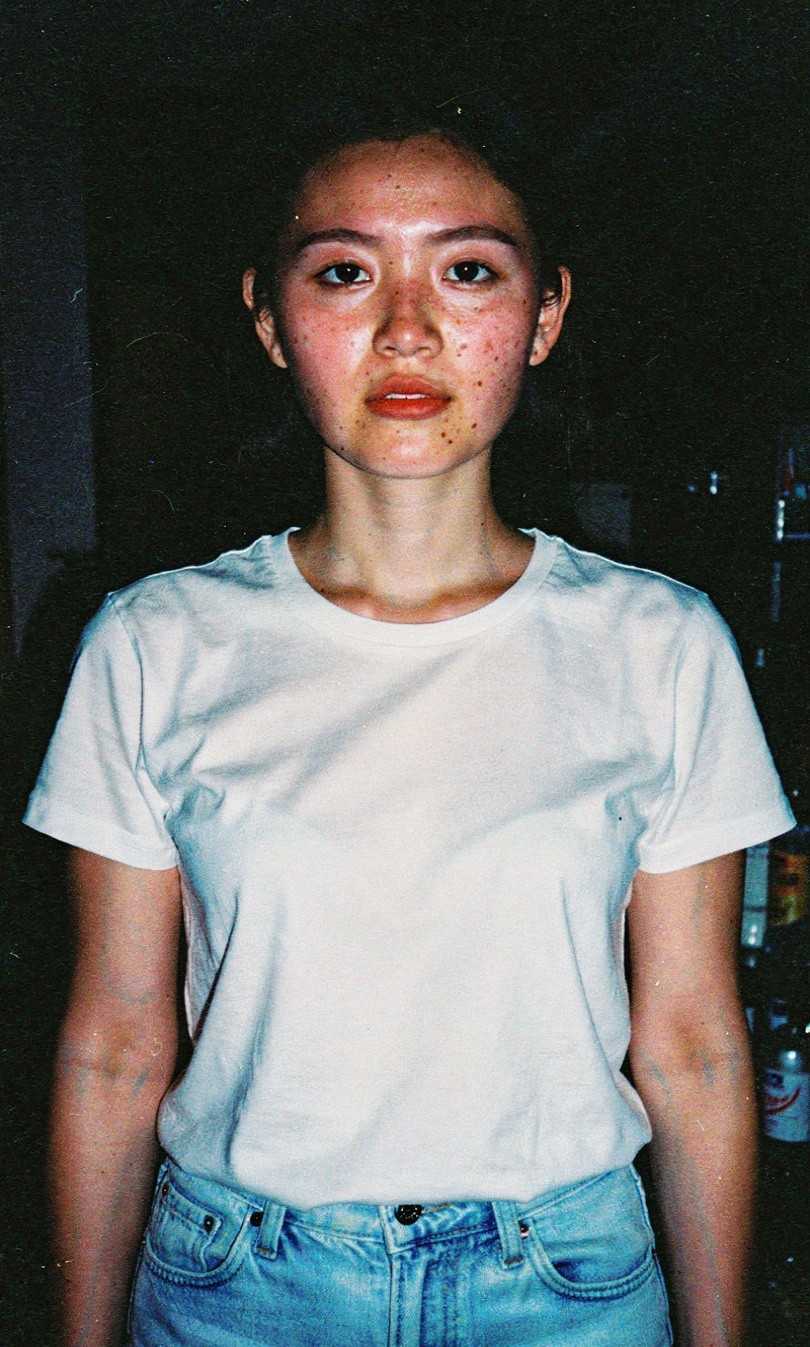
Best with a clear front-facing or 3/4 portrait, indoors or at night
Example 1 — Direct Flash Portrait
BAD PROMPT
make my photo look like an instagram flash pic
Why it fails: It's too vague. The AI doesn't know what era of flash photography, what background, or how strong the effect should be, so it usually applies a generic brightness boost instead of the actual flash aesthetic.
GOOD PROMPT
Edit this photo to look like a direct on-camera flash shot from a 2000s digital point-and-shoot camera. Apply strong, slightly overexposed flash lighting on the subject's face and clothing, with deep, near-black shadows in the background. Add subtle film grain and a faint blue-white color cast typical of early digital flash photos. Keep the subject's face, proportions, and expression identical to the uploaded photo. Output as a vertical 4:5 image suitable for an Instagram post.
Why it works: It names the exact camera era, specifies how strong the flash and shadow contrast should be, locks the face to the original photo, and sets the aspect ratio so the output is ready to post without cropping.
Example 2 — Nightlife Flash with Friends
BAD PROMPT
edit this to look cool and trendy for instagram
Why it fails: "Cool and trendy" means nothing to an AI model. There's no subject description, no lighting direction, and no output format, so results are wildly inconsistent between runs.
GOOD PROMPT
Transform this group photo into a candid nightlife flash photo. Use a direct camera flash with glossy highlights on skin and clothing, blurred neon signage in the background, and a grainy 35mm film texture. Slightly warm the skin tones while keeping background lights cool-toned for contrast. Preserve every person's face, hairstyle, and identity exactly as shown. Crop to a square 1:1 format.
Why it works: It separates foreground (warm skin tones) from background (cool neon) treatment, which is what creates the editorial contrast people associate with this look, and it explicitly protects every face in a group shot.
2. Cinematic Teal-and-Orange Color Grade
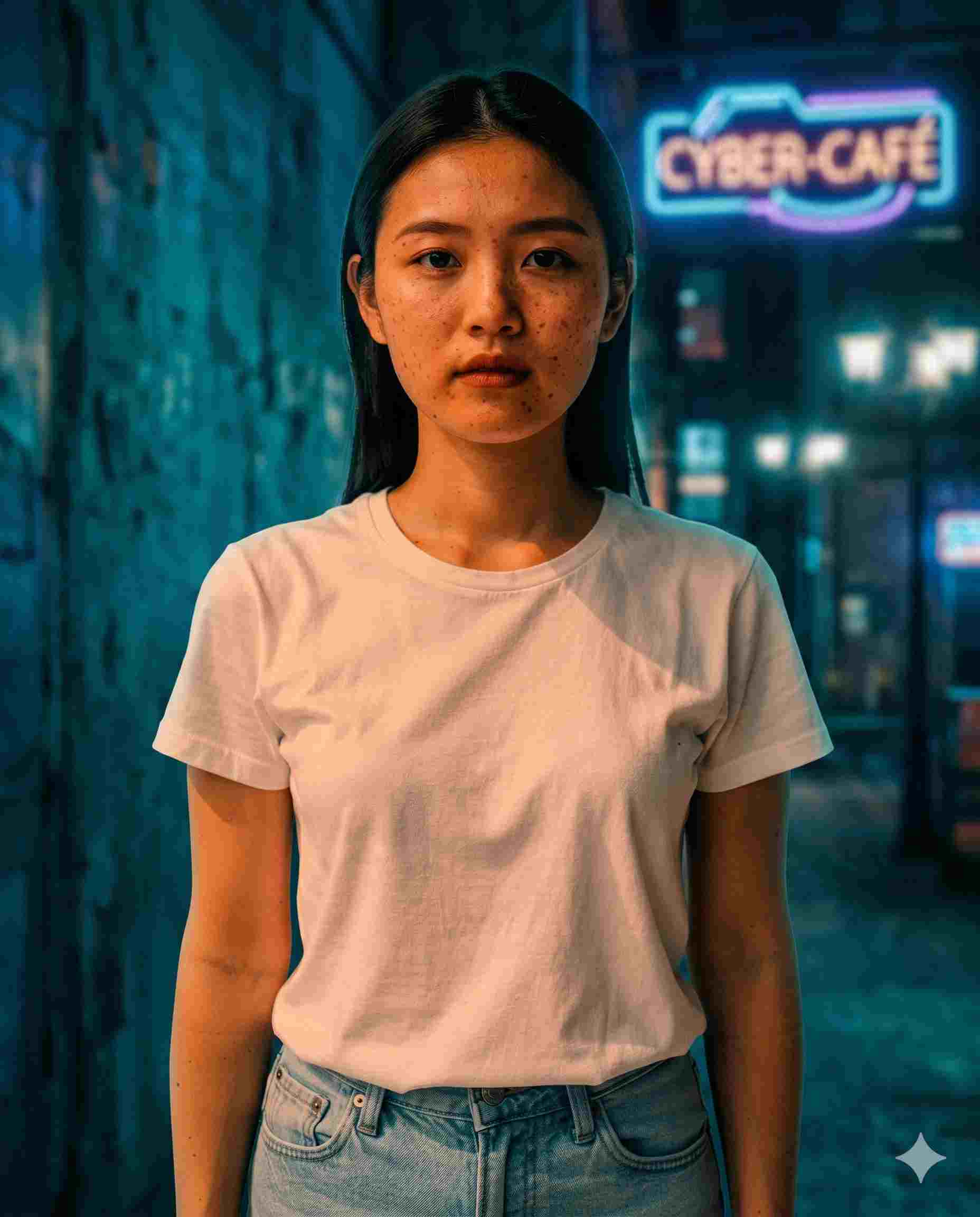
This is a Hollywood color-grading technique, push skin tones toward orange and everything else toward teal/blue, repurposed for street and night photography on Instagram. Photographers have used this grade for years; AI tools just made it a one-line prompt instead of a 20-minute Lightroom session.
Works best on outdoor or street photos with some background lighting or signage
Example 1 — Night Street Portrait
BAD PROMPT
give this a cinematic color grade
Why it fails: "Cinematic" is one of the most overused and underspecified words in AI prompting. Without naming the actual color shift, the AI might apply a random teal tint, a warm vintage tone, or barely change anything.
GOOD PROMPT
Apply a cinematic teal-and-orange color grade to this photo. Shift skin tones and warm light sources toward orange, and shift shadows, backgrounds, and cool light sources toward teal and deep blue. Enhance any neon or street lights with a soft bloom/halation glow. Slightly lift shadow detail while keeping the subject sharp with a subtle rim-light glow on one side. Maintain the subject's facial features and identity exactly as in the original photo. Output in 4:5 portrait ratio.
Why it works: It defines the grade as two separate color directions (subject vs. background), names the specific effect (halation/bloom) instead of a vague mood word, and controls shadow detail so the image doesn't go muddy.
Example 2 — Old Money Aesthetic
BAD PROMPT
make this look luxury and expensive
Why it fails: There's no description of what 'luxury' means visually, so the model could interpret it as anything from gold filters to a completely different background.
GOOD PROMPT
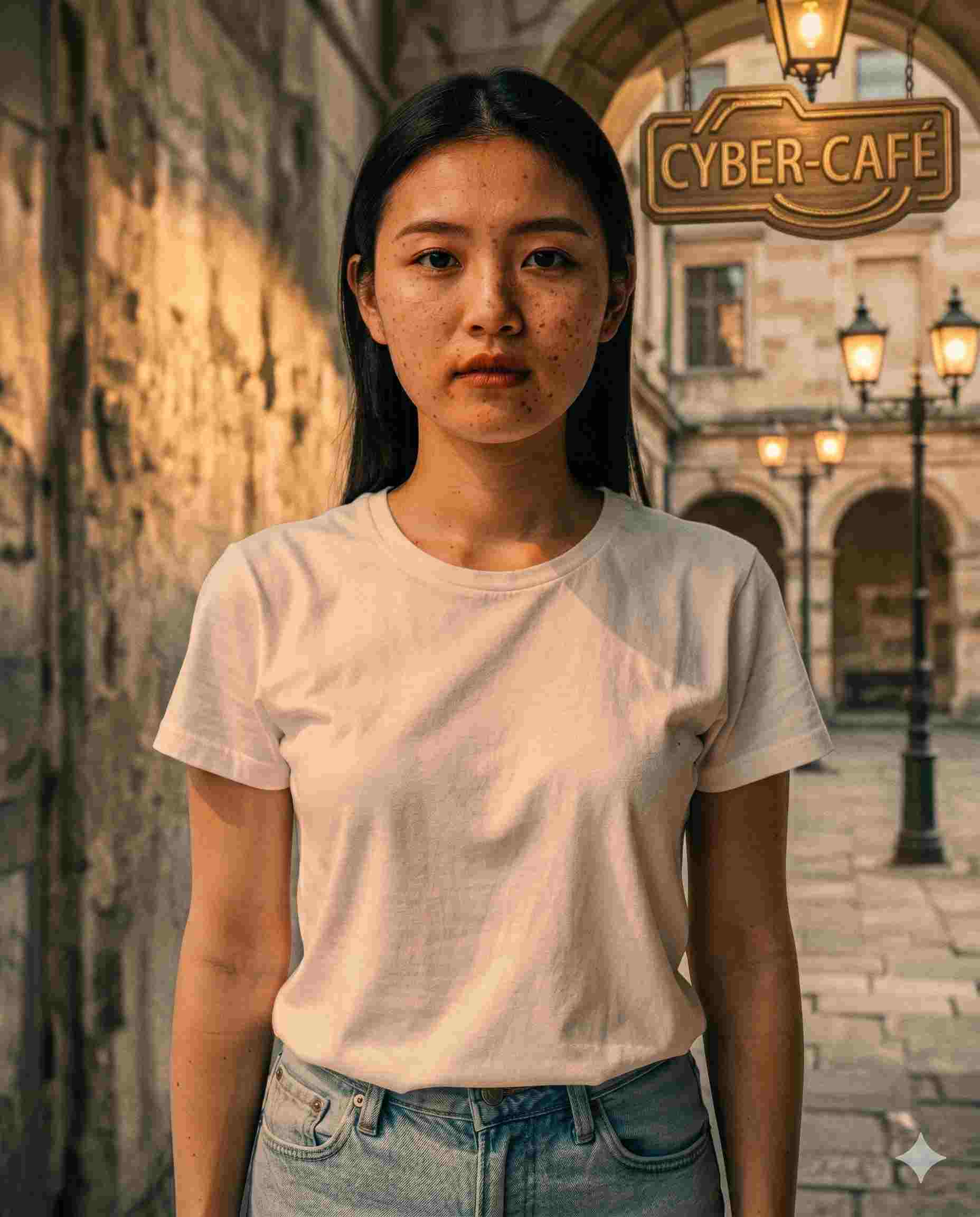
Edit this photo for an "Old Money" aesthetic. Desaturate vibrant colors toward muted earth tones, increase clarity and sharpness on fabric textures, and add a subtle linen-texture overlay across the image. If there is architecture in the background, enhance it to resemble a historic stone estate with warm, golden-hour sunlight. Do not alter the subject's face, body shape, or clothing style, only the color grade, texture, and lighting. Output as a high-resolution 4K image.
Why it works: It translates a vague style word into concrete edits, desaturation, texture, lighting direction, and explicitly restricts the AI to grading and lighting only, so the subject doesn't get reshaped.
3. The Retro Bollywood Saree Transformation
This is currently one of the most-shared trends on Instagram in India and across the diaspora: turning a regular selfie into a 90s Bollywood movie poster style portrait wearing a saree, with grainy film texture and golden-hour lighting. Gemini's Nano Banana model is the tool most people use for this because it preserves the face while changing the outfit and background entirely.
Use a clear face-forward photo, good lighting, simple background
Example 1 — Vintage Bollywood Poster
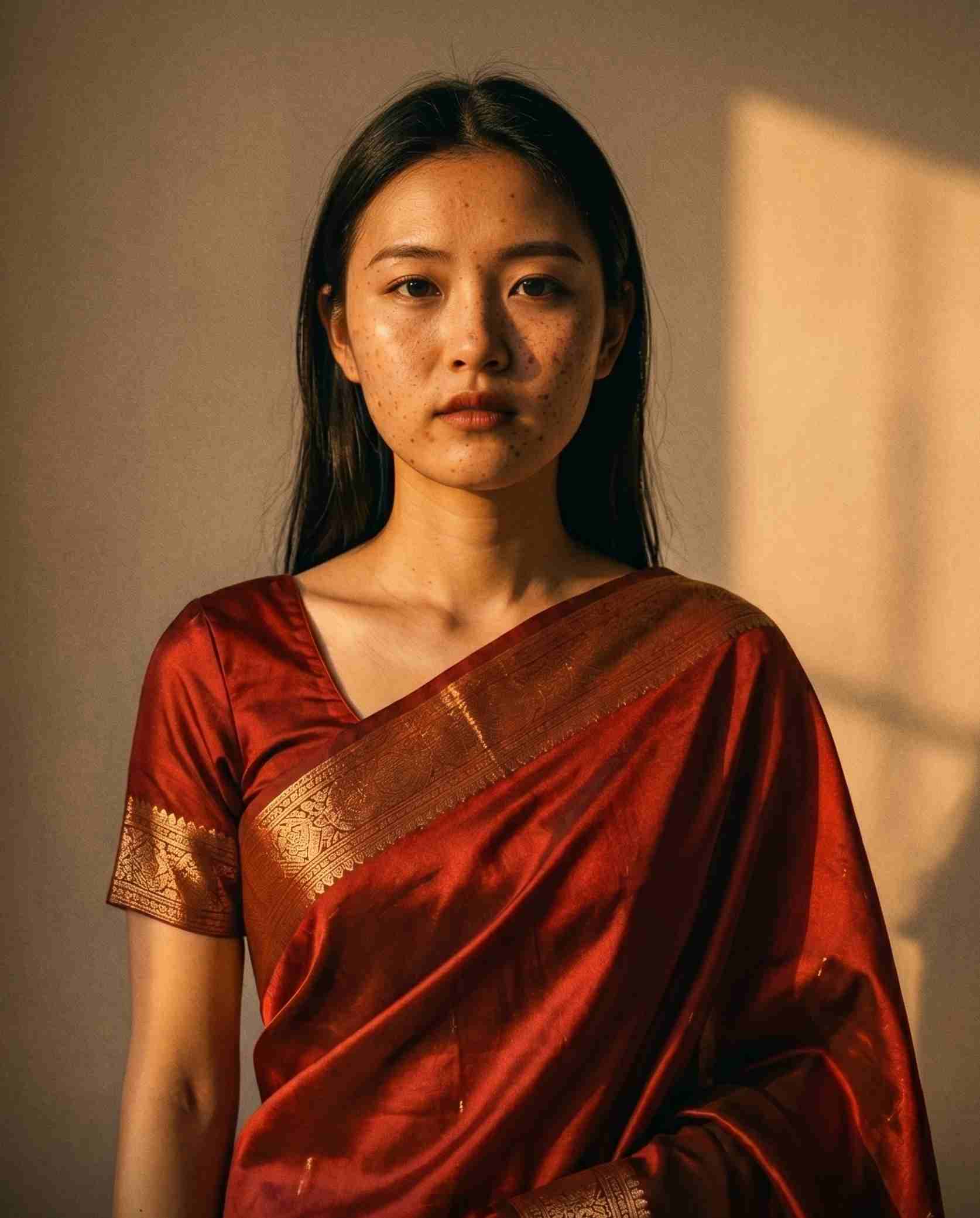
BAD PROMPT
turn me into a bollywood actress with a saree
Why it fails: It's a fun idea but gives the AI zero guidance on saree color, fabric, lighting, or era, so the output often looks like a generic costume overlay rather than the retro film-poster style people are going for.
GOOD PROMPT
Turn this person into a 90s retro-inspired Bollywood movie poster portrait wearing a shimmering deep red silk saree with gold border detailing. Background should be a softly lit studio wall with warm, dramatic golden-hour lighting and gentle shadow falloff. Add a subtle grainy film texture consistent with 1990s film photography. Preserve the person's exact facial features, skin tone, and hairstyle, do not alter or beautify the face. Output as a vertical 4:5 portrait.
Why it works: It specifies the saree's fabric, color, and border style, names the lighting setup, and locks identity preservation as a hard constraint so the result still looks like the person who uploaded it.
Example 2 — Traditional South Indian Look
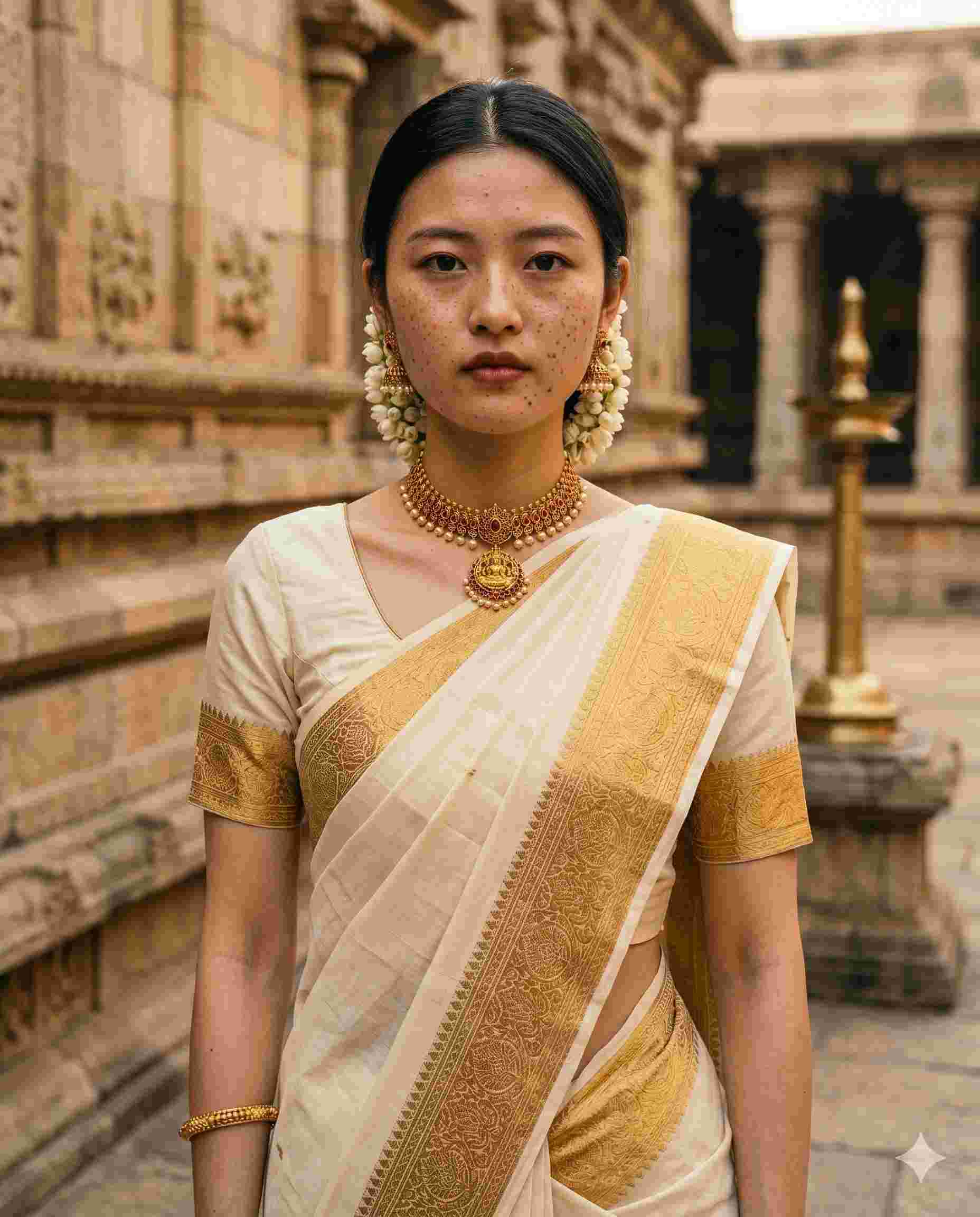
BAD PROMPT
make a saree photo with temple background
Why it fails: It's missing the fabric type, color palette, lighting style, and any identity-preservation instruction, all of which heavily change how 'temple background' gets rendered.
GOOD PROMPT
Edit this photo into a traditional South Indian portrait wearing a white-and-gold kasavu silk saree with a temple- inspired stone background. Use soft, natural daylight with warm undertones and minimal shadow. Keep the fabric texture realistic with visible silk sheen and gold thread detail. The subject's face, expression, and proportions must match the uploaded photo exactly, with no beautification or reshaping. Output at high resolution suitable for printing.
Why it works: It names a specific regional saree style (kasavu) instead of a generic 'saree,' specifies lighting as soft and natural rather than dramatic, and again hard-locks the face so the cultural styling doesn't override the person's identity.
One honest take here: a lot of these saree edits look stunning, but I'd be careful about how widely you share them. AI watermarks on these tools can be cropped out, and the realism is good enough that these images can be mistaken for real photos. Use them for fun, just be mindful of where they end up.
4. AI Polaroid Photos (With Friends, Family, or Yourself)
The AI polaroid trend places you, sometimes alongside a friend, family member, or a stylized version of yourself, into a polaroid-style snapshot with the classic white border, soft flash, and slightly faded color. It's exploded because it feels personal and nostalgic in a way that pure aesthetic filters don't.
Best with 1-2 people, front-facing, casual setting
Example 1 — Throwback Polaroid
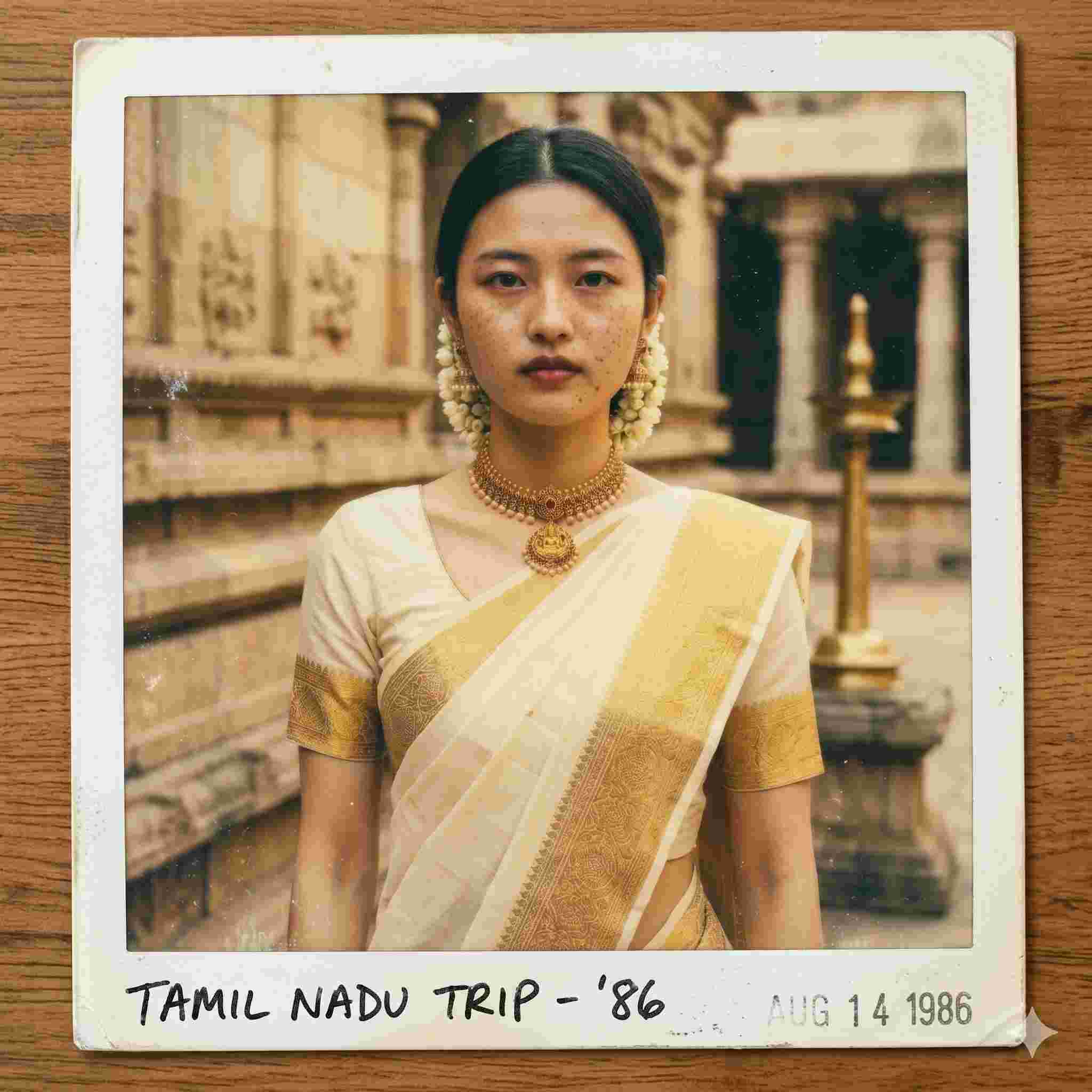
BAD PROMPT
make this look like a polaroid
Why it fails: It only addresses the border and doesn't tell the AI anything about lighting, color fading, or how to treat the people in the photo, so the result is often just a white frame slapped on an unchanged image.
GOOD PROMPT
Edit this photo to look like an authentic 1980s polaroid snapshot. Add the classic white polaroid border with slightly uneven edges. Apply a soft, slightly faded color palette with warm yellow undertones, mild blur at the edges, and a gentle flash-lit look on the subject's face. Add light dust and grain texture across the image. Keep the subject's face and proportions exactly as in the original photo. Output as a square 1:1 image with the polaroid border included in frame.
Why it works: It separates the border treatment from the color and lighting treatment, specifies the exact decade's color cast (warm yellow), and tells the AI the border must be part of the final image, not added separately.
Example 2 — "Me and a Friend" Polaroid
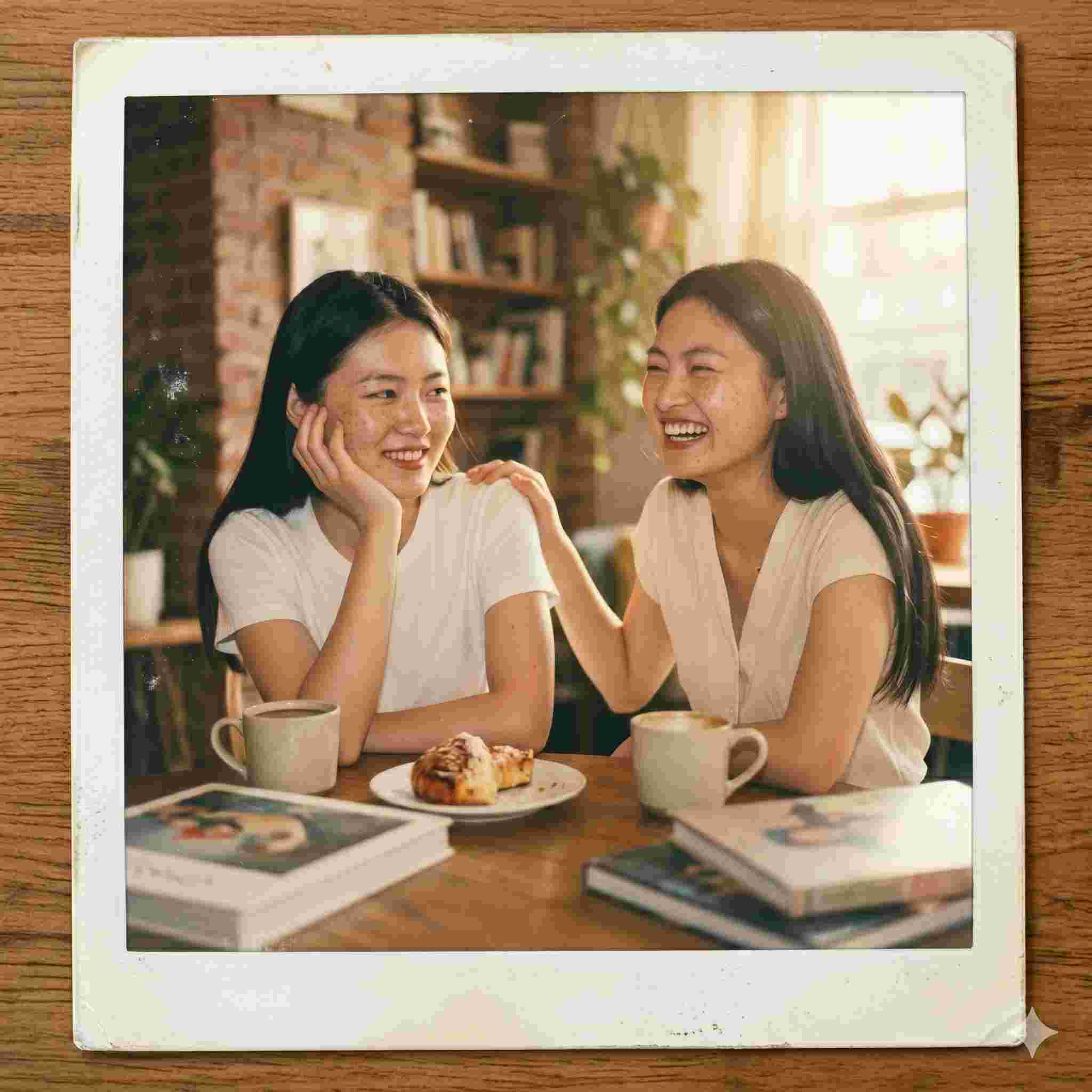
BAD PROMPT
polaroid of me and my friend hanging out
Why it fails: It doesn't describe the setting, pose, lighting, or how to handle two faces, so the AI may invent a generic background that doesn't match either person's actual environment.
GOOD PROMPT
Create a candid polaroid-style photo of these two people hanging out in a casual indoor setting, like a cafe or living room with warm ambient lighting. Use a soft on-camera flash look with mild overexposure on faces, a slightly faded vintage color tone, and the classic white polaroid border. Both people should appear relaxed and naturally posed, not stiff. Preserve both individuals' facial features and identity exactly as shown in their uploaded photos. Output as a 1:1 square image with visible polaroid border.
Why it works: It gives the AI a concrete setting category (cafe/living room) instead of leaving it blank, describes the desired pose energy (relaxed, not stiff), and explicitly handles identity preservation for two people instead of one.
5. 'Aura Farm' Editorial Portraits
Aura farm prompts produce moody, editorial-level portraits with strong emotional lighting, the kind of image that looks like it belongs on a magazine cover rather than a phone camera roll. The name comes from internet slang for someone who has a strong, confident 'aura,' and the prompts are built to visually communicate exactly that.
Works with any portrait, but stronger results with a confident pose
Example 1 — Moody Editorial Portrait
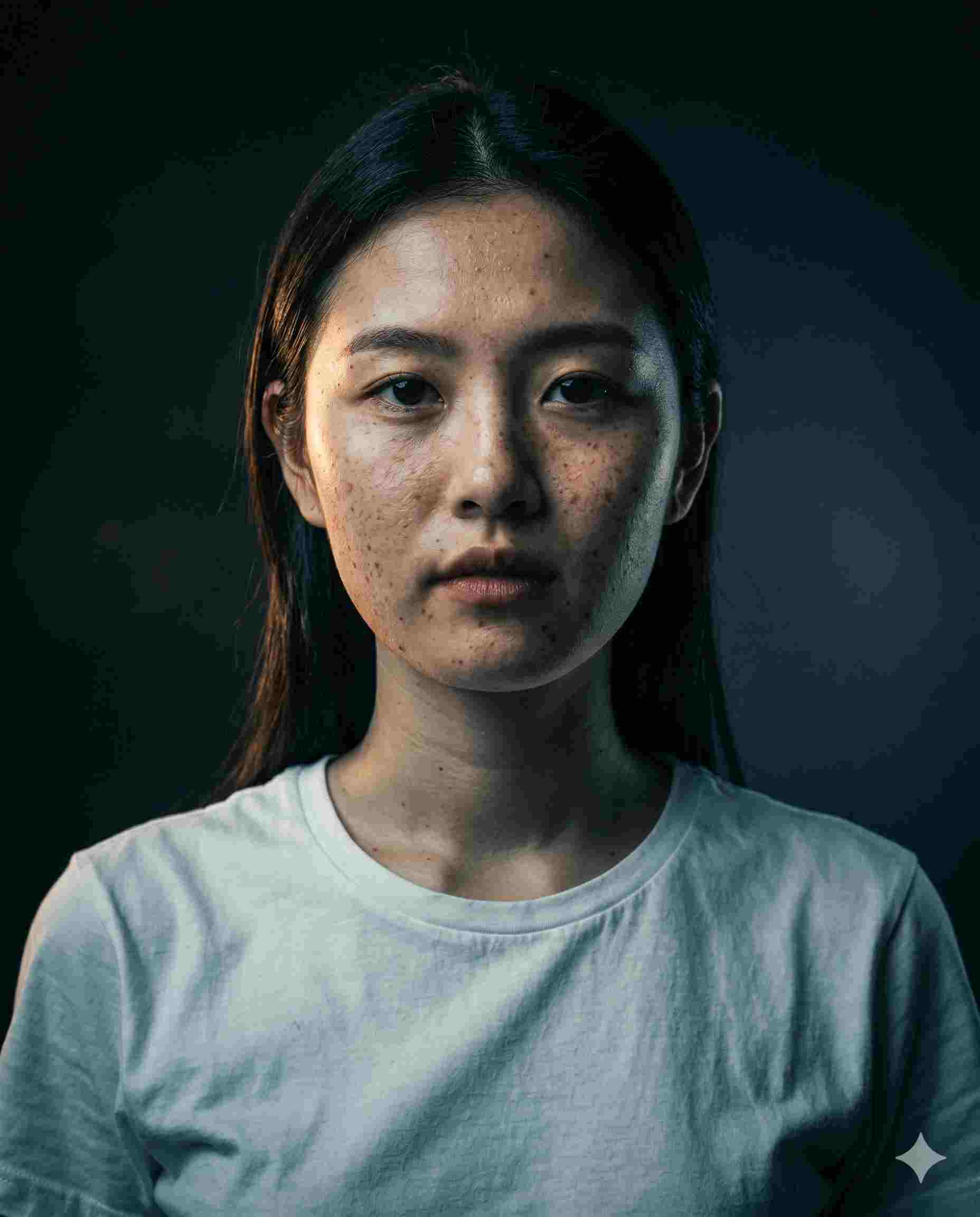
BAD PROMPT
give me an aura farm edit
Why it fails: The term itself is internet slang with no fixed visual definition, so without describing lighting, color, and composition the AI is guessing at a trend it may interpret very differently each time.
GOOD PROMPT
Transform this portrait into a moody, editorial-style image with strong directional lighting from one side, creating deep shadows on the opposite side of the face. Use a desaturated, cool-toned color palette with selective warm highlights on the skin. Background should be dark and minimal, slightly out of focus. The subject's pose and expression should convey calm confidence. Preserve the subject's exact facial features, hairstyle, and proportions. Output as a high-contrast 4:5 portrait suitable for an Instagram profile photo.
Why it works: It converts a slang term into specific lighting direction, color treatment, and composition instructions, and ties the 'aura' feeling to a measurable visual cue (high contrast, directional light, minimal background).
Example 2 — Confident Studio Portrait
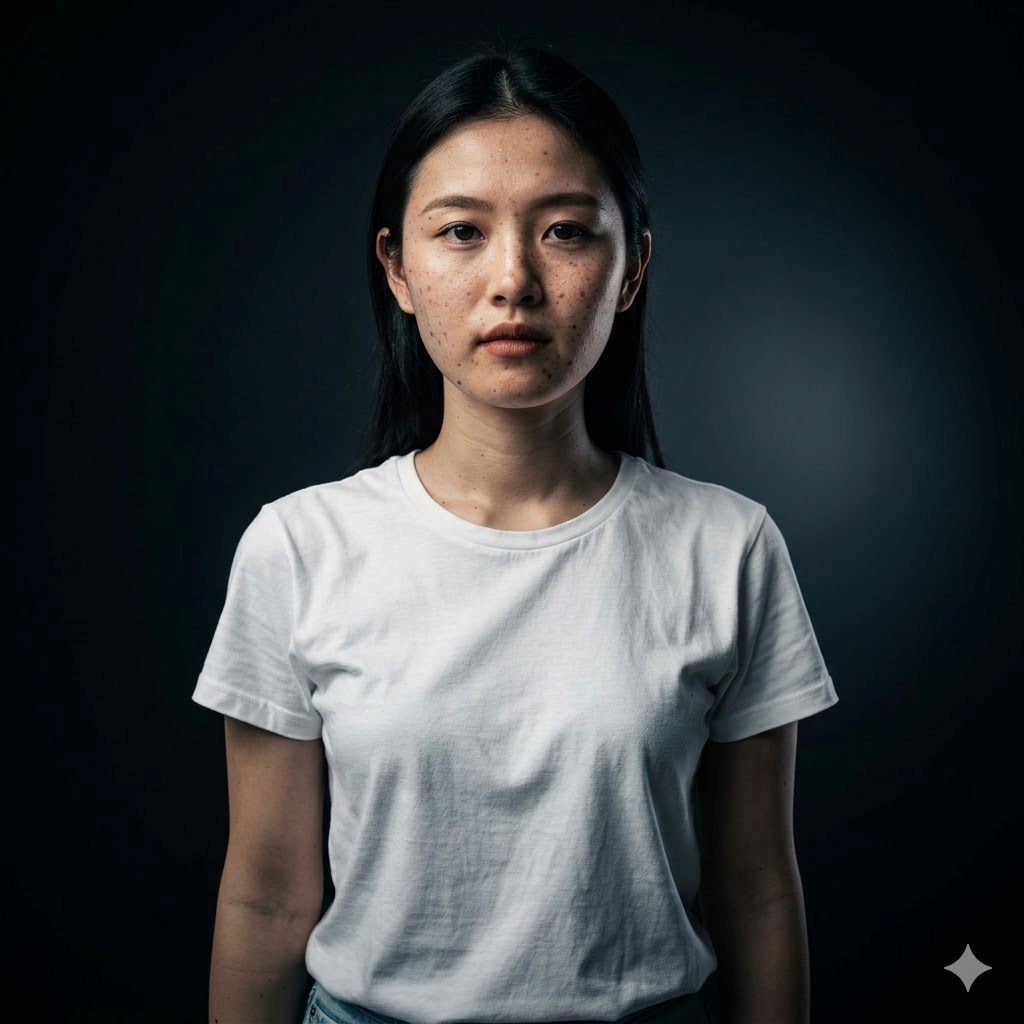
BAD PROMPT
make me look powerful and cool in this pic
Why it fails: Subjective adjectives like 'powerful' and 'cool' don't translate to pixels. The AI needs lighting setup, background, and color direction, not a mood word.
GOOD PROMPT
Edit this portrait into a high-end studio shot with a single key light from the upper left, creating sculpted shadows across the face and jawline. Use a near-black studio background with subtle gradient lighting. Apply a slightly desaturated, high-contrast color grade. Keep the subject's expression neutral and composed. Do not change the subject's facial structure, skin tone, or proportions, adjust lighting and color only. Output as a square 1:1 high-resolution image.
Why it works: It specifies the exact light position (upper left key light) and what that light should do (sculpt the jawline), which is the actual mechanism behind a 'powerful' looking portrait, instead of asking the AI to interpret the word directly.
6. Y2K and 1990s Film Grain Aesthetic
The 35mm film look brings back light leaks, heavy grain, and slightly muted colors, the visual signature of disposable cameras and early digital point-and-shoots. This pairs well with street style, outfit-of-the-day posts, and travel photos.
Best for outdoor, street, or candid lifestyle shots
Example 1 — Disposable Camera Look
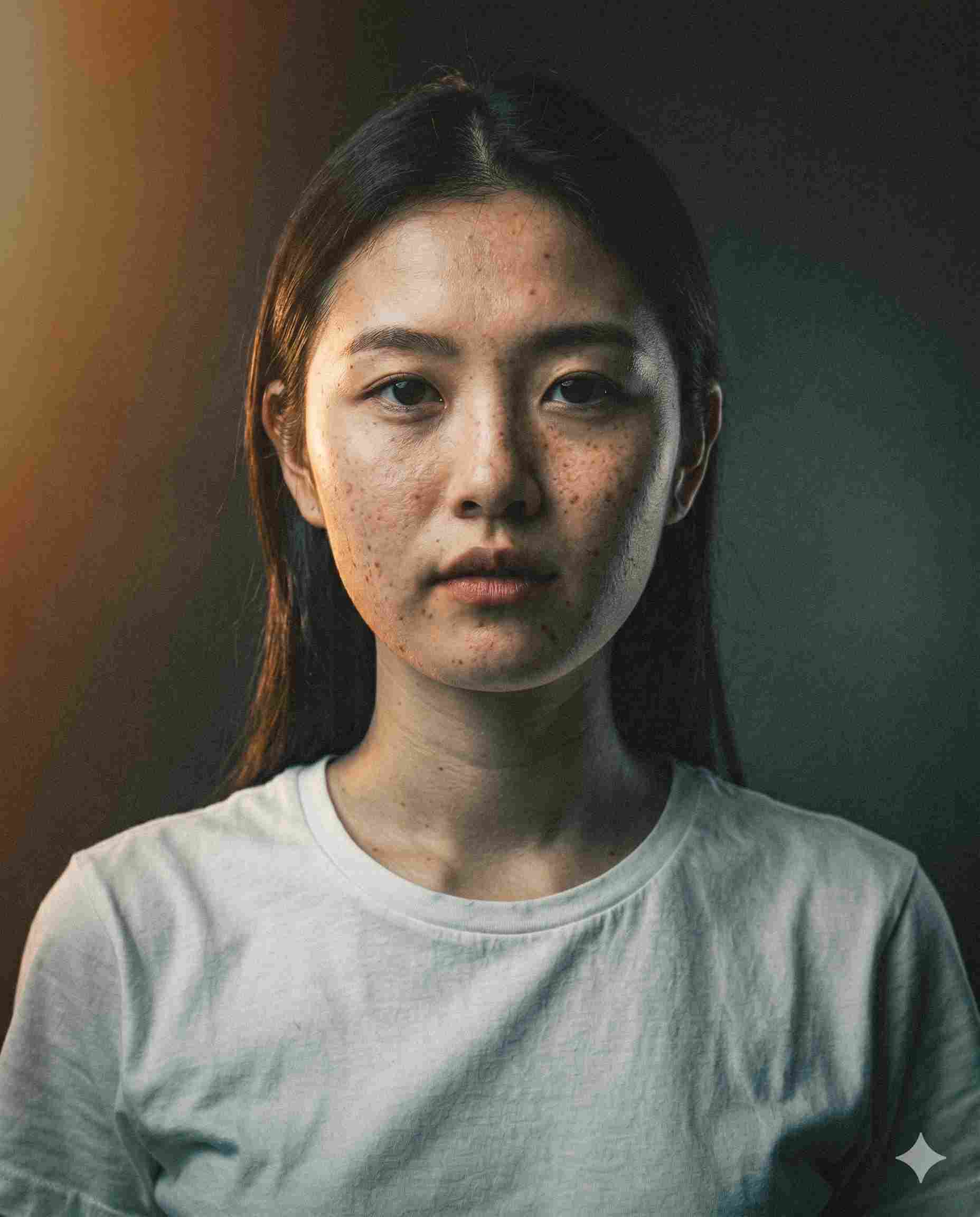
BAD PROMPT
make this look like an old film photo
Why it fails: "Old film" spans nearly a century of photographic styles, from 1920s sepia to 1990s color negative. The AI has no way to know which era or grain intensity you actually want.
GOOD PROMPT
Edit this photo to have a 1990s 35mm disposable camera aesthetic. Add heavy, visible film grain across the entire image, a slight warm light leak in one corner, and high- contrast flash-on-subject lighting if there's a visible flash source. Mute the greens and blues slightly while warming up skin tones for a nostalgic, candid feel. Keep the composition and subject placement unchanged. Output in the original aspect ratio of the uploaded photo.
Why it works: It pins down the exact decade and film format, specifies where the light leak goes and how strong the grain should be, and tells the AI which colors to mute versus warm, rather than applying a blanket vintage filter.
Example 2 — Pastel Dreamscape
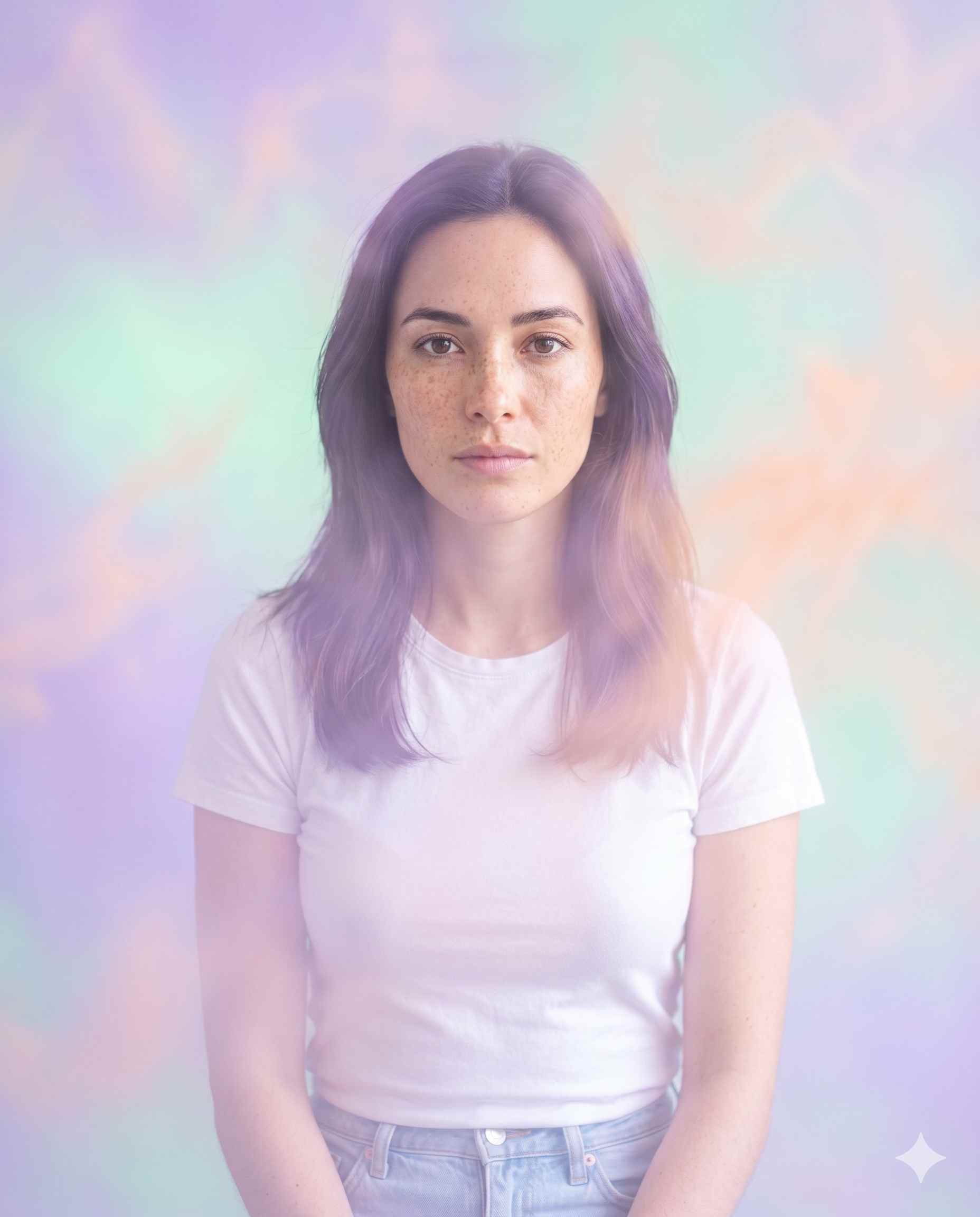
BAD PROMPT
add a dreamy filter to this photo
Why it fails: "Dreamy" could mean soft focus, pastel colors, lens flare, or all three at once. Without naming the specific technique, results vary wildly between generations.
GOOD PROMPT
Transform this image into a soft pastel-toned dreamscape. Apply a color palette shifted toward lavender, mint green, and peach across the image. Add a soft-focus glow effect (Orton effect) that brightens highlights slightly while keeping the subject recognizable and not overly blurred. Lighting should feel hazy and ethereal, like early morning fog. Preserve the subject's facial features clearly. Output as a 4:5 vertical image.
Why it works: It names the specific photographic technique (Orton effect) that produces the 'dreamy' look, defines the color palette with three named colors instead of one vague word, and sets a limit on how much blur is acceptable.
7. Instagram Milestone and Achievement Posters
Creators hitting follower milestones, like 1K, 10K, or 100K, are turning ordinary selfies into cinematic celebration posters with Instagram-branded visual elements in the background. This trend is popular with influencers and small creators marking growth moments.
Use a confident, well-lit photo, ideally with some space around the subject
Example — Follower Milestone Poster
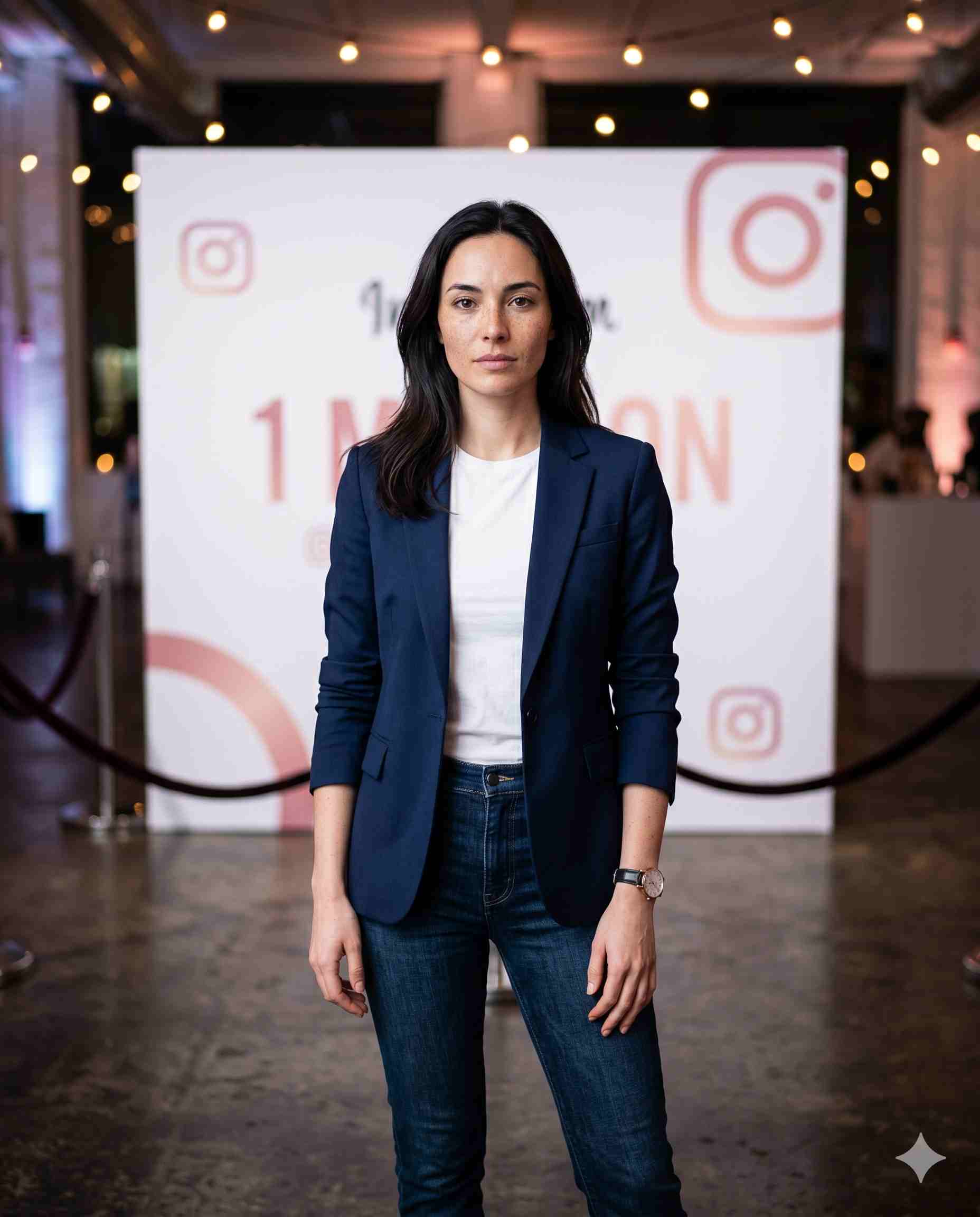
BAD PROMPT
make a poster celebrating my 10k followers
Why it fails: It doesn't describe the layout, lighting, pose, or how strictly the AI should preserve the subject's face, so results often look like generic stock-photo collages with a number pasted on top.
GOOD PROMPT
Create an ultra-realistic Instagram milestone celebration poster in a vertical 4:5 composition, styled as a premium cinematic influencer announcement. Use the uploaded photo as the only facial reference, preserving exact facial features, hairstyle, skin tone, and proportions with no beautification. Show the subject standing confidently in front of a large, softly blurred Instagram-themed backdrop in white and pink tones. Add subtle bokeh lighting and a celebratory but understated mood. Leave clean negative space at the bottom third of the image for adding text afterward.
Why it works: It enforces strict identity preservation as a named rule (something AI models follow more reliably when stated explicitly and early), defines the backdrop's color and blur level, and reserves space for text instead of letting the AI generate its own (often misspelled) numbers.
8. Fixing Common AI Editing Problems
Most bad results come from three repeated mistakes: missing identity-preservation instructions, vague mood words instead of concrete lighting and color terms, and no output format. Fixing all three usually turns a mediocre result into a sharable one.
Problem: The Face Looks Different After Editing
Add this line at the start or end of any prompt: "Use the uploaded image as the only facial reference. Preserve exact facial features, skin tone, hairstyle, and proportions, no reshaping or beautification." Gemini's Nano Banana model responds especially well to this phrasing because it was trained with strong face-consistency behavior as a core feature.
Problem: The Output Looks Too AI-Generated or Plastic
Add texture instructions: film grain, fabric texture, skin texture, or paper texture, whatever fits the style. AI models tend to oversmooth by default, and naming a specific texture forces a more realistic finish.
Problem: The Aspect Ratio Doesn't Fit Instagram
Always end your prompt with an explicit output ratio: 4:5 for feed portraits, 1:1 for square grid posts, or 9:16 for Reels and Stories covers. Without this, models often default to a square or landscape ratio that needs cropping.
Frequently Asked Questions
What is the best AI tool for Instagram photo editing prompts in 2026?
Google's Gemini 2.5 Flash Image model, widely nicknamed "Nano Banana," is currently the most popular choice for Instagram editing prompts because it preserves facial identity across heavy style changes. ChatGPT's image tool is a close second, often producing a softer, more painterly finish on the same prompt.
How do I make AI keep my face the same after editing?
Add an explicit identity-preservation instruction to your prompt, something like "use the uploaded image as the only facial reference, preserve exact facial features and proportions, no beautification." Stating this as a hard rule, rather than hoping the model infers it, is the single biggest factor in face consistency.
Are AI-generated Instagram photos watermarked?
Google adds an invisible SynthID watermark to images generated with Gemini's Nano Banana model as of 2025, and a visible badge may also appear depending on the app. These watermarks can be cropped or edited out, so they don't guarantee an image will be labeled as AI-generated everywhere it's shared.
What is the AI saree trend on Instagram?
The AI saree trend uses Gemini's Nano Banana model to turn a selfie into a retro Bollywood-style portrait wearing a saree, often with 90s film grain and golden-hour lighting. It went viral in late 2025 and remains one of the most-used prompt categories into 2026.
Which aspect ratio should I use for Instagram AI prompts?
Use 4:5 for feed posts, 1:1 for square grid layouts, and 9:16 for Reels covers and Stories. Specifying this in your prompt avoids the default square or landscape output that most image models produce without instruction.
Can I use these AI editing prompts for free?
Yes. Gemini offers free-tier access to its image generation features through the Gemini app, and ChatGPT's free tier includes a limited number of image generations per day as of mid-2026. Paid tiers remove daily caps and unlock higher resolution outputs.
Why does my AI-edited photo look fake or overly smooth?
This usually happens when a prompt doesn't specify texture. Adding terms like "film grain," "realistic skin texture," or "visible fabric weave" forces the model away from its default oversmoothed look and toward a more photographic result.
Follow along on promptailearning.com for weekly guides on prompting, AI tools, and getting more out of every model.
Recommended Blogs
If you found this useful, these posts go deeper on related topics:
• Best Claude AI Prompts 2026: 25+ Types With Examples