
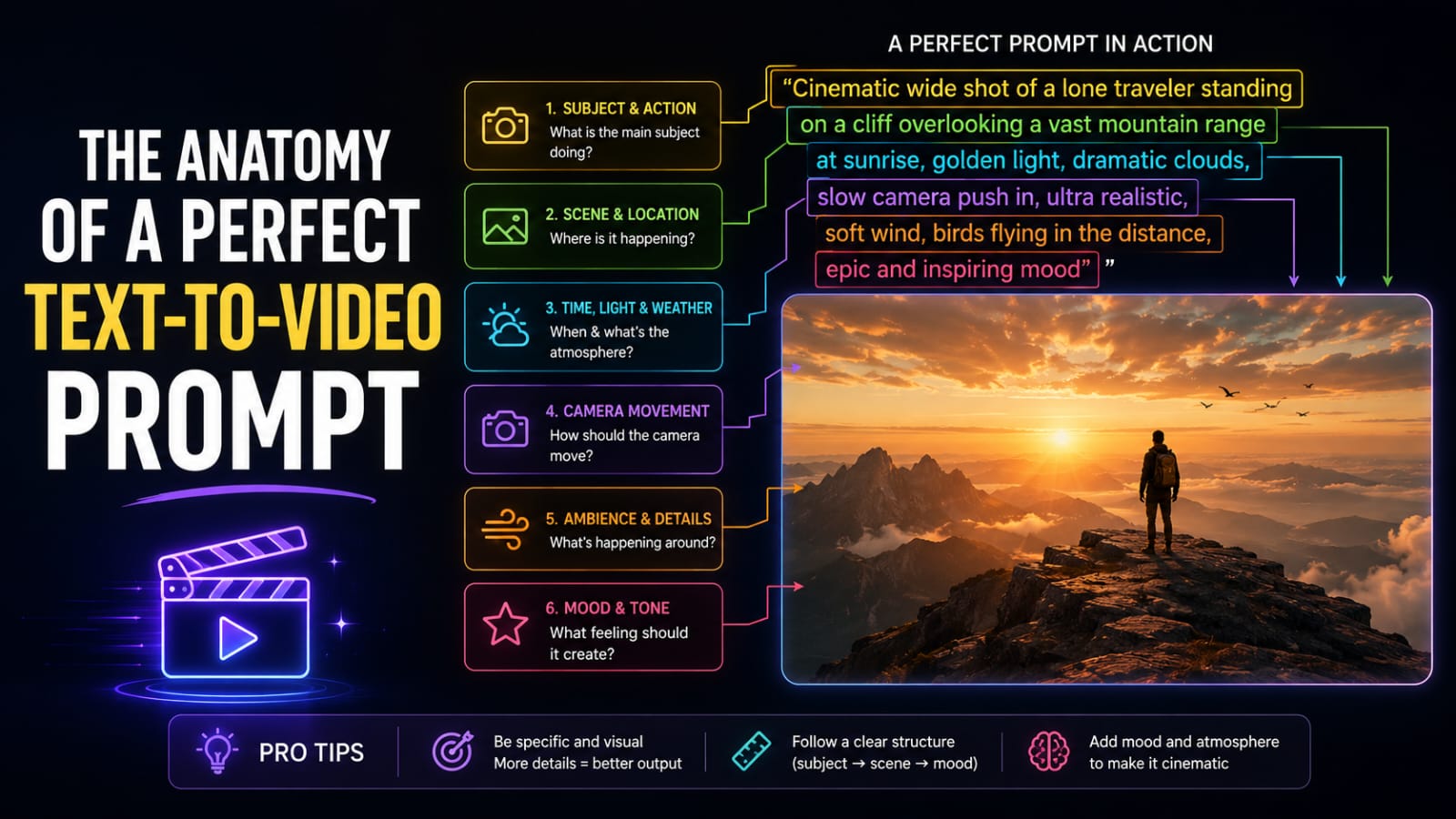
The Anatomy of a Perfect Text-to-Video Prompt
Most people write text-to-video prompts the same way they'd describe a dream to a friend: vague, sequential, and missing the one detail that actually makes the scene work. "A woman walking in Tokyo at night" is not a prompt. It's a subject line.
I've tested hundreds of prompts across Sora 2, Runway Gen-3, and Kling 2.0, and the single biggest factor separating cinematic output from flickering garbage is structural completeness. Not creativity. Structure. The models know how to render a beautiful shot. They don't know which shot you want unless you tell them.
This guide breaks down every layer of a production-ready text-to-video prompt: subject, camera movement, lighting, physics, and temporal consistency. I'll show you the exact syntax for each one, with Bad, Good, and Expert tiers so you can see precisely where most prompts break down.
Why Text-to-Video Prompts Fail (And What to Do Instead)
Text-to-video models are not dumb. They're directionally confused. When you write "a busy street at night," the model has to guess at camera angle, motion speed, lighting color temperature, crowd density, and whether the scene holds visually consistent or cuts to something else entirely. Unsurprisingly, it guesses wrong.
The failure modes cluster into four categories:
• Subject drift: the person, object, or scene changes appearance mid-clip
• Camera chaos: uncontrolled zoom, unintended rotation, or jarring movement that was not requested
• Lighting inconsistency: the color temperature or shadow direction shifts randomly across frames
• Physics glitches: hair that does not move in wind, water that freezes, cloth that clips through objects
Every one of these is a prompting failure, not a model failure. Each can be corrected with explicit syntax. The rest of this guide gives you that syntax.
The Five Dimensions of a Complete Video Prompt
A production-ready text-to-video prompt covers five distinct layers. Think of them as the cinematographer's checklist: every layer answers a question the model would otherwise guess at.
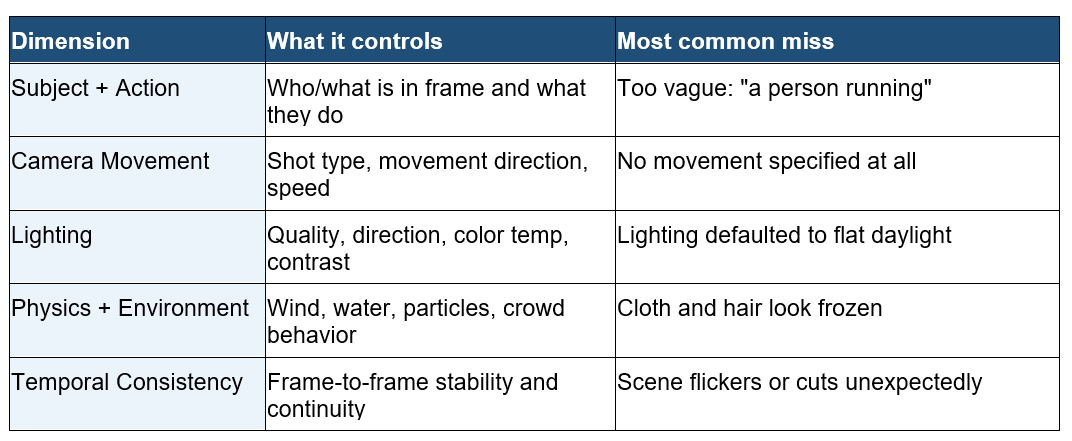
Dimension 1: Subject and Action
The subject is the anchor of your scene. Every other dimension orbits around it. The model needs to know who or what is in frame, what they look like (enough to stay consistent), what they are doing, and at what speed.
This is the layer most people get 80% right. They name a subject and describe an action. Where they fail is specificity: without enough visual detail, the model's interpretation of "a woman" changes from frame to frame. Add clothing, hair, and one identifying feature, and the subject locks in.
Subject and Action: Three-Tier Example
Bad Prompt (what most people type)
A woman walking in a city at night.
Good Prompt (adds structure and context)
A woman in a red trench coat walking through a busy Tokyo street at night. Neon signs overhead.
Expert Prompt (production-ready, fully specified)
A woman in a crimson knee-length trench coat and black ankle boots walks briskly through a crowded Shinjuku street, Tokyo, 11pm on a rain-slicked evening. She carries a black leather bag over her left shoulder. She moves at a natural walking pace of approximately 1.2 meters per second, slightly faster than the surrounding crowd. Crowd density is high: 15-20 people visible in background, moving at varied speeds in multiple directions.
What changed: The Expert prompt locks in clothing color, walking speed relative to the crowd, a specific location, and a visual anchor (the bag) that helps maintain subject identity across frames. The model now has enough information to keep this exact person consistent through the clip.
Dimension 2: Camera Movement Syntax
Camera movement is the most under-specified element in 90% of text-to-video prompts I have seen. People describe what happens in the scene and forget to tell the model where the camera is standing or how it moves. The model then improvises, and improvisation at the camera level produces the most disorienting output.
The syntax is cinematography vocabulary. You do not need to invent new terms. Use the exact language that camera operators use on film sets: the models have been trained on enough film content to understand these precisely.
Camera Movement Reference
• Static shot: camera does not move. Locked off on a tripod.
• Pan left / pan right: camera rotates horizontally on a fixed axis. The frame sweeps left or right.
• Tilt up / tilt down: camera rotates vertically on a fixed axis. Used to reveal height or follow vertical motion.
• Dolly in / dolly out: the camera physically moves toward or away from the subject on a track. Produces a different feel from zoom.
• Tracking shot: camera moves parallel to the subject, maintaining the same distance. The subject stays centered while the background changes.
• Push in: a slow, deliberate dolly in used for dramatic emphasis or reveal.
• Aerial / drone shot: camera positioned high above the scene, often with sweeping horizontal movement.
• Handheld: camera introduces naturalistic micro-movements suggesting a human operator. Used for documentary or action feel.
• Arc / orbit: camera moves in a circular path around the subject.
Camera Movement: Three-Tier Example
Bad Prompt (what most people type)
Show a mountain peak with clouds.
Good Prompt (adds structure and context)
A snow-capped mountain at sunrise with low clouds moving through the valleys. Drone shot moving slowly forward.
Expert Prompt (production-ready, fully specified)
A snow-capped granite mountain peak at 6am, golden sunrise light breaking over the right ridge. Low-lying cloud layer fills the valley below. Drone shot: starts at valley level 800m from the peak, slow push in toward the mountain at approximately 2m per second, camera slightly tilted upward at 15 degrees to keep the peak framed in the upper third. No rotation. Smooth, mechanically stable movement with no vertical drift. Shot duration: 8 seconds.
What changed: The Expert prompt converts "slow drone shot" into a specific starting distance, speed, angle, and framing rule. The model no longer needs to guess how far or fast to move, which eliminates the most common drone shot failure: overshoot or random rotation mid-clip.
Dimension 3: Lighting Specifications
Lighting is where most text-to-video prompts age the fastest. "Beautiful lighting" means nothing to the model. "Golden hour backlighting from the west with a blue fill from the sky" means everything.
There are four lighting attributes to specify: quality (hard vs soft), direction (where the light comes from), color temperature (warm/cool and specific source), and contrast (ratio between highlight and shadow). You do not need all four every time, but you need at least two, or the model defaults to flat, sourceless daylight.
Lighting Reference by Category
Time-of-day lighting:
• Golden hour: 30-60 minutes after sunrise or before sunset. Warm orange-yellow light at low angle. Long shadows. High visual appeal.
• Magic hour: the brief window when sky provides soft, diffused, directionless light. Low contrast, highly flattering.
• Midday harsh: direct overhead sun. High contrast, hard shadows straight down. Unflattering on faces, dramatic on landscapes.
• Overcast diffused: cloud cover creates a giant soft box. Shadowless, cool-neutral color temperature.
• Blue hour: just before sunrise or just after sunset. Deep blue ambient light with no sun. Extremely cinematic.
Artificial and stylized lighting:
• Neon: pink, cyan, or green color cast from signage. Strong colored fill from one or multiple directions.
• Rim lighting: light source placed behind subject, creating a luminous edge outline. Separates subject from background dramatically.
• Three-point: key light (main), fill light (soften shadows), backlight (separate from background). Standard professional setup.
• Silhouette: subject backlit so strongly the front face goes dark. Only outline is visible.
• Candlelight / tungsten: warm amber, 2700-3200K color temperature. Soft, flickering, intimate.
Lighting: Three-Tier Example
Bad Prompt (what most people type)
A portrait of a man in a cafe.
Good Prompt (adds structure and context)
A middle-aged man with gray beard sitting at a wooden cafe table. Warm lighting from the left. Bokeh background.
Expert Prompt (production-ready, fully specified)
A middle-aged man with a salt-and-pepper beard and dark blue linen shirt sits at a worn oak cafe table. Lighting: single tungsten pendant lamp positioned 40cm above and to the left, casting warm amber key light at 45 degrees. Right side of face falls into soft shadow (1:3 lighting ratio). Background is out-of-focus warm bokeh from string lights, color temperature approximately 2800K throughout. No overhead fluorescent fill. No natural daylight.
What changed: The Expert prompt specifies the light source, its position, the shadow ratio, and explicitly excludes lighting the model might otherwise add (overhead fill, natural daylight). Exclusions are as important as inclusions when specifying lighting.
Dimension 4: Physics and Environment
Physics is the dimension that makes a scene feel real or fake. Hair that does not respond to wind, cloth that clips through surfaces, smoke that moves too fast or too slowly: these are all physics prompt failures. The model has physical simulation capability built in. You just need to activate it with explicit instructions.
My personal rule: if something in your scene could move, specify whether it does and how. Do not leave it to default behavior.
Physics Specification Categories
Wind and fabric:
• Specify wind speed relative to a reference: "light breeze, coat hem lifts slightly" or "strong wind, coat and hair blown back at 30 degrees."
• For loose fabric, name the behavior: "rippling," "billowing," "draped still."
Water:
• Still: flat mirror surface, no movement, slight color reflection
• Rippling: slow surface movement, small waves from wind or distant disturbance
• Flowing: directional current, specify fast or slow
• Crashing: waves breaking against surface with foam and spray
Particles and atmosphere:
• Rain: light drizzle vs heavy downpour vs visible streaks in frame
• Fog and mist: specify density (light haze, dense fog, ground mist)
• Smoke: rising, drifting directionally, dissipating
• Dust: kicked up from movement, settling, caught in light beam
• Snow: falling (specify density and speed), accumulated on surfaces
Physics: Three-Tier Example
Bad Prompt (what most people type)
A bonfire on a beach at night.
Good Prompt (adds structure and context)
A large bonfire on a dark beach at night. Flames are orange and yellow. People sitting around it.
Expert Prompt (production-ready, fully specified)
A large driftwood bonfire on a dark sandy beach at 10pm. Flames are deep orange with yellow and white hot cores, reaching 2 meters high with natural variation in height (+/- 30cm). Light sea breeze from the left causes flame to lean 15 degrees right and flicker at natural intervals of 0.5-2 seconds. Embers drift upward from the base and fade within 60cm. Thin smoke rises and drifts right with the wind. Five people seated in a loose semicircle at 3-meter distance, their faces and near sides lit with the warm 2200K firelight, far sides in deep shadow. Ocean visible in background, low rolling waves audible but not visible in primary frame.
What changed: The Expert prompt specifies flame height, wind effect on flame angle, ember behavior, smoke direction, and how the firelight falls on the people. Every physical element has a behavior rule. Nothing defaults.
Dimension 5: Temporal Consistency
Temporal consistency is the hardest dimension to get right and the one most beginners never think about. It refers to keeping every visual element stable across all frames of the clip: same lighting, same color grading, same subject appearance, no unexpected cuts, no spontaneous background changes.
This is a prompting layer, not a settings layer. You cannot fix temporal drift in a settings panel. You fix it by telling the model, explicitly, what must stay constant.
Temporal Consistency Instruction Templates
• "Maintain consistent lighting color temperature throughout. No shift from warm to cool."
• "Keep subject in frame at all times. No full occlusion."
• "Single continuous shot. No scene cuts, jump cuts, or dissolves."
• "Preserve film grain and color grading throughout. No variation in grain density."
• "Camera movement is smooth and continuous. No jerks, stops, or directional reversals."
• "Subject face and clothing remain identical across all frames. No morphing or style drift."
• "Background depth and bokeh level consistent throughout. No refocusing events."
• "Motion blur consistent with scene speed. No random sharp-freeze frames."
Temporal Consistency: Three-Tier Example
Bad Prompt (what most people type)
A car driving through a forest road.
Good Prompt (adds structure and context)
A red sports car driving along a winding forest road in autumn. Shot from the front, tracking backward.
Expert Prompt (production-ready, fully specified)
A red 1960s-style sports car with chrome trim drives at 60km/h along a winding two-lane road through dense autumn forest. Leaves are orange, red, and yellow. Overcast soft light, no direct sun. Camera: tracking shot backward at matching speed, maintaining 8-meter distance from front bumper, slight low angle (camera at hood height). Temporal consistency: maintain overcast light quality throughout with no sunlight breaks; car color and chrome reflections stay constant; tree density and road curvature continuous with no teleporting; camera speed locked to car speed at all times; no cuts, no speed ramps, smooth continuous motion across full 10-second clip.
What changed: The Expert prompt adds a dedicated temporal consistency block at the end that reads as a checklist for the model. Naming what must not change (light breaks, teleporting, speed ramps) is often more effective than describing what should happen.
Model-Specific Differences: Sora vs Runway Gen-3 vs Kling 2.0
The five dimensions apply to every text-to-video model. But each model interprets certain syntax differently. Knowing these differences saves you from prompting Runway like it's Sora, or over-specifying in Kling where it handles defaults better.
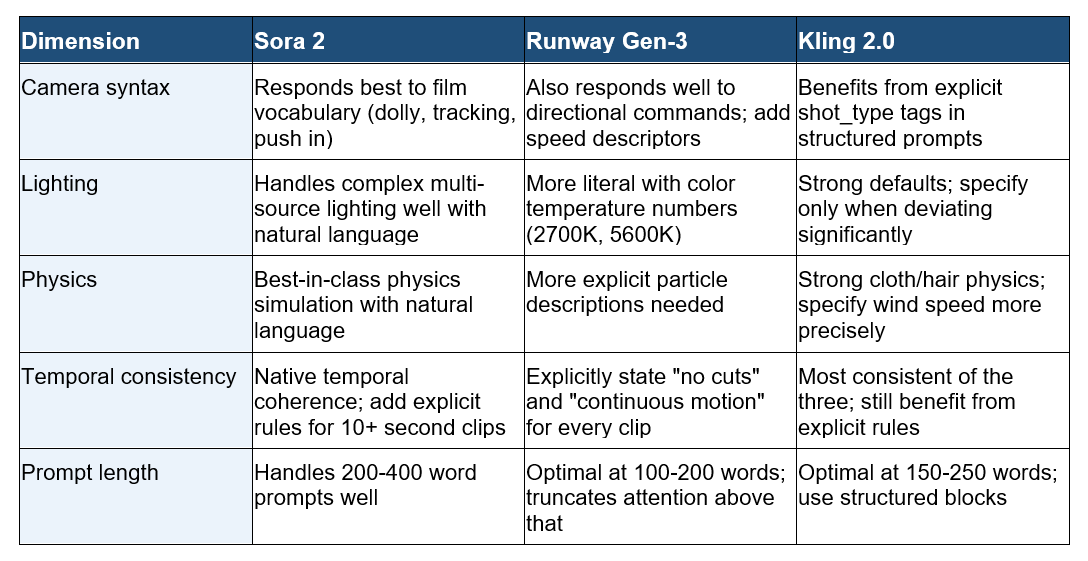
One opinion I hold firmly: Runway Gen-3 is the most sensitive to over-prompting. When a prompt exceeds roughly 200 words, the model starts prioritizing the beginning and ignoring the end. Put your temporal consistency instructions in the middle, not at the bottom, when working in Gen-3.
Copy-Paste Template: Complete Text-to-Video Prompt
Use this exactly as written. Replace the [brackets] with your specifics. Delete any dimension that does not apply to your scene.
[SUBJECT]: A [detailed description of person/object: clothing, color, size, identifying feature] [ACTION] in/at [specific location with time of day].
[CAMERA]: [Shot type: static/tracking/dolly in/pan left/aerial]. Camera [movement direction and speed]. [Framing rule: subject in left/center/right third, distance from subject].
[LIGHTING]: [Primary source: type + position + direction]. [Color temperature: warm/cool + source name or Kelvin value]. [Shadow quality: hard/soft, ratio]. [Any light sources to exclude].
[PHYSICS]: [Wind effect on clothing/hair: none/light/strong + direction]. [Any particles: rain/fog/smoke/dust + density and behavior]. [Water behavior if present]. [Crowd movement if present].
[TEMPORAL CONSISTENCY]: Single continuous shot, no cuts. [What must remain constant: lighting, camera speed, subject appearance]. [What must not happen: no teleporting, no style drift, no speed ramps]. [Frame rate if specific: 24fps/30fps/60fps].
Save this to your prompt library at promptailearning.com/prompts.
Prompt Glossary
These are the technical terms used throughout this guide. Bookmark this section for reference.
Temporal consistency: The property of a video clip where visual elements (lighting, subject appearance, camera position) remain stable across all frames without flickering or drifting.
Dolly in / dolly out: A camera movement where the entire camera physically moves toward (in) or away from (out) the subject. Produces a different visual effect from zoom, which changes focal length while the camera stays in place.
Tracking shot: A camera movement where the camera follows the subject by moving parallel to their path, maintaining consistent distance.
Push in: A slow, deliberate dolly in. Used for emotional emphasis or gradual subject reveal.
Rim lighting: A light source placed behind the subject that creates a bright outline around their silhouette, separating them visually from the background.
Color temperature: Measured in Kelvin (K). Lower values (2700K) are warm amber. Higher values (6500K) are cool blue. Specifying this number gives text-to-video models precise lighting instructions.
Physics specification: In text-to-video prompting, the practice of explicitly describing how physical elements (wind, water, gravity, cloth) behave in the scene rather than letting the model default.
Shot type: The combination of camera position and framing. Examples: extreme close-up (ECU), close-up (CU), medium shot (MS), wide shot (WS), aerial, low-angle, high-angle.
Bokeh: Out-of-focus blur in the background of a shot. Produced by wide aperture lenses. In prompting, specify "shallow depth of field with background bokeh" to activate it.
Recommended Blogs
If you found this useful, these posts go deeper on related topics:
Best Gemini AI Prompts 2026: 100+ Templates With Examples
Best Claude AI Prompts 2026: 25+ Types With Examples
Best ChatGPT Prompts 2026: 200+ With Real Examples
AI Models Directory: Compare 60+ LLMs, Image and Video Models
Frequently Asked Questions
What is a text-to-video prompt?
A text-to-video prompt is a natural language instruction given to AI video generation models like Sora, Runway Gen-3, or Kling 2.0. It describes what should appear in the video clip, including subjects, actions, camera movements, lighting, and environment. More detailed prompts produce more controlled, cinematic outputs.
What is the difference between Sora, Runway Gen-3, and Kling 2.0?
All three generate video from text, but differ in strengths. Sora 2 (OpenAI) handles long prompts well and produces highly realistic physics. Runway Gen-3 performs better with shorter, focused prompts and is widely available via API. Kling 2.0 (Kuaishou) has strong default physics for cloth and hair and excels at longer clips with stable temporal consistency. As of June 2026, Sora 2 produces the most cinematic output but has slower generation times.
How long should a text-to-video prompt be?
For Sora 2, prompts of 150 to 400 words work well. For Runway Gen-3, keep prompts under 200 words and prioritize the most critical instructions at the beginning. For Kling 2.0, 150 to 250 words in structured blocks (subject, camera, lighting, physics, consistency) produces the most predictable results. Longer is not always better: precision matters more than length.
How do I stop a text-to-video model from adding unwanted camera movements?
Explicitly include the phrase "static shot" or "locked-off camera" in your prompt. Most models interpret the absence of camera movement instructions as permission to add movement by default. If you see tracking or panning you did not request, add a temporal consistency instruction: "camera does not move at any point, fully static, no drift."
What does temporal consistency mean in video prompts?
Temporal consistency means all visual elements remain stable across every frame of the clip: the lighting does not shift, the subject does not change appearance, the camera does not jerk or cut unexpectedly. You enforce temporal consistency by adding explicit instructions to your prompt: "maintain consistent lighting throughout," "no scene cuts," and "subject appearance remains identical across all frames."
How do I specify lighting in a text-to-video prompt?
Use cinematography vocabulary: name the light source (tungsten pendant, neon signage, overcast sky), its position (overhead, 45 degrees from the left, backlight), its color temperature (warm amber at 2800K, cool daylight at 5600K), and the shadow quality (hard and directional, soft and diffused). Also specify what lighting should NOT be present to prevent the model from adding unwanted fill lights.
Which text-to-video model is best for realistic physics?
As of June 2026, Sora 2 produces the most physically realistic cloth, water, and particle behavior when given detailed physics prompts. Kling 2.0 has strong defaults for hair and clothing simulation with less prompting effort. Runway Gen-3 benefits most from explicit physics instructions. For scenes with complex physical interactions (fire, water, crowds), Sora 2 currently leads.
Can I use text-to-video prompts from image generation (like Midjourney) as
a starting point?
Partially. Subject and lighting descriptions transfer well from image to video prompts. However, image prompts lack the camera movement, physics, and temporal consistency layers that video prompts require. Use your Midjourney subject and lighting descriptions as a base, then add all three video-specific dimensions before submitting to Sora, Runway, or Kling.
Follow along on promptailearning.com for weekly guides on prompting, AI tools, and getting more out of every model.