
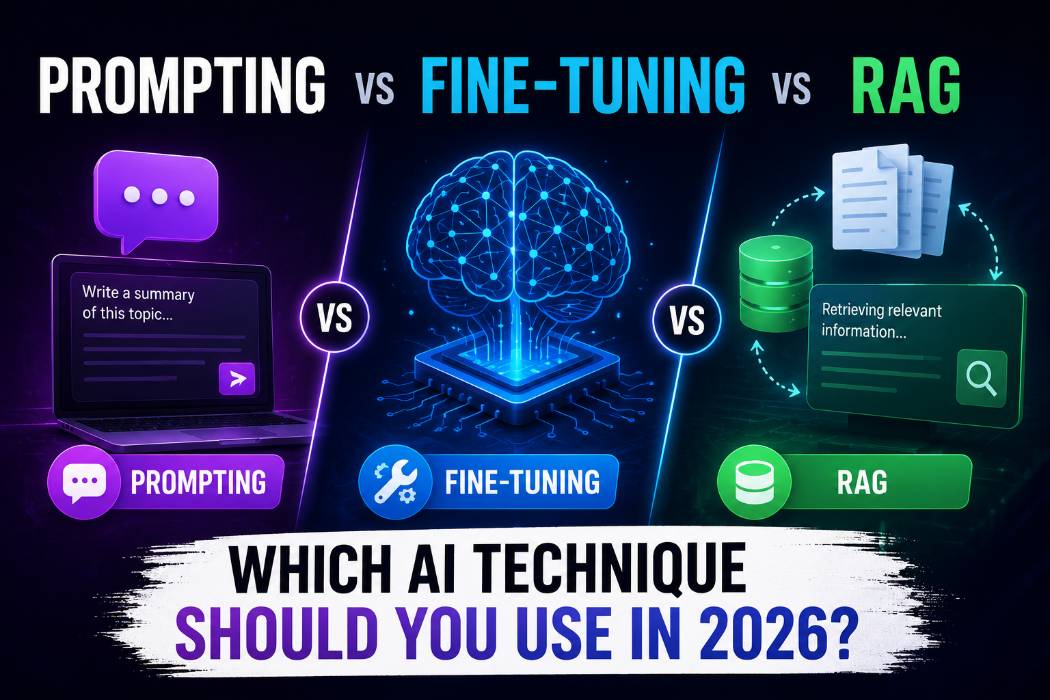
Prompting vs Fine-Tuning vs RAG: Which AI Technique Should You Use in 2026?
90% of teams I see reach for fine-tuning first. That's the wrong move almost every time. Prompting costs nothing and takes minutes. RAG costs $70–$1,000/month and takes days. Fine-tuning costs $5,000+ upfront and takes weeks. The framework for choosing between them is simpler than you think — and most people are skipping the cheap, fast option because nobody explained when to stop.
This guide gives you the full picture: what each technique actually does, real prompt examples with bad/good pairs, a decision table, and a 10-term glossary you can bookmark.
What Is Prompt Engineering? (And When Is It Enough)
Prompt engineering is the practice of structuring your inputs to a language model so you get the output you actually want. No model retraining. No new infrastructure. Just better instructions.
I'll say this plainly: for 80% of use cases, prompt engineering alone is enough. If your knowledge base fits in the model's context window and your data doesn't change daily, spend 30 minutes on your prompt before you spend $5,000 on fine-tuning.
Prompt engineering works best when:
• You're prototyping or validating an idea this week
• Your knowledge is small and stable (fits in context)
• You need a specific output format like JSON, markdown, or tables
• You want fast iteration with near-zero engineering investment
Example 1 — Writing a Product Description
BAD PROMPT
Write a product description for my coffee maker.
Why it fails: No persona, no format, no length, no audience. The AI will produce a generic two-sentence blurb with zero commercial value.
GOOD PROMPT
You are a senior DTC copywriter specializing in kitchen appliances. Write a product description for a premium stainless steel pour-over coffee maker.
Requirements:
- Audience: coffee enthusiasts aged 28–45 who value craft and aesthetics
- Length: 80–100 words - Format: 2 short paragraphs — lead with sensory experience, close with specs
- Tone: confident, minimal, no exclamation marks
- End with one sentence CTA starting with "Available at..."
Why it works: Role + task + audience + format + constraints + length + tone. The model has no ambiguity left. Every parameter is decided.
Example 2 — Summarising a Legal Document
BAD PROMPT
Summarise this contract.
Why it fails: No output format, no target audience, no priority. You'll get a paragraph that vaguely covers everything and nails nothing.
GOOD PROMPT
You are a legal analyst summarising contracts for non-lawyers.
Summarise the following contract using this exact structure:
## KEY DATES
[List each deadline, renewal date, and termination window]
## PAYMENT TERMS
[Amounts, schedule, late penalties]
## RED FLAGS
[Clauses that favor the other party or create unusual risk]
## MY ACTION ITEMS
[What I need to do before signing]Use plain English. No legalese. Each section: 3–5 bullet points max. [PASTE CONTRACT HERE]
Why it works: Structured output format means you can copy this directly into a client email. The role and tone instructions ensure it's readable, not verbose.
What Is RAG? (Retrieval-Augmented Generation Explained)
RAG connects a language model to a live database at inference time. When you ask a question, the system retrieves relevant documents from that database, injects them into the prompt as context, and lets the model answer using that real-time data.
The core insight: RAG changes what the model knows at the moment of the query. Fine-tuning changes how the model reasons permanently. These are fundamentally different problems.
Use RAG when:
• Answers need access to data newer than the model's training cutoff
• You need source citations and auditable references (legal, compliance, finance)
• Your knowledge base is large, growing, and constantly updated
• Hallucination risk is unacceptable and traceability is mandatory
Hot take: RAG is overused by teams who haven't tried good prompting first. If your knowledge base fits in 200K tokens, Claude Opus 4.6's full context window handles it without any retrieval infrastructure at all.
Example 3 — Customer Support Bot (Prompting vs RAG Contrast)
BAD PROMPT (no grounding)
Answer customer questions about our return policy.
Why it fails: The model will hallucinate your return policy from training data patterns. Whatever it says has nothing to do with your actual rules.
GOOD PROMPT (RAG-grounded)
You are a customer support agent for [Company Name].
Use ONLY the following retrieved policy document to answer. Do not invent information.
If the answer is not in the document, say: "I need to check this with our team."--- RETRIEVED DOCUMENT ---
{retrieved_policy_chunk}
--- END DOCUMENT ---Customer question: {customer_question}
Answer in 2–3 sentences. Always cite the specific policy section you used.
Why it works: The injected document grounds every answer. The 'do not invent' instruction prevents hallucination. The citation requirement creates auditability.
What Is Fine-Tuning? (The Heavy Weapon)
Fine-tuning retrains a pre-trained model on your labeled dataset. It modifies the model's weights — changing not just what it knows, but how it reasons, what style it defaults to, and what decision logic it applies consistently.
This is the most powerful technique. It's also the most expensive and the slowest to iterate. I only recommend it when prompting and RAG have both failed to solve the problem, or when you need behavioral consistency at scale that a system prompt simply can't enforce.
Fine-tuning is worth it when:
• The model must consistently apply domain-specific jargon and reasoning style
• You're serving 10,000+ users and need token-efficient inference (shorter prompts)
• You need the model to follow a complex decision framework that's too long for a system prompt
• Your data is stable, proprietary, and won't change quarterly
Warning: Poorly executed fine-tuning causes catastrophic forgetting — where the model loses general reasoning capabilities while specializing. Budget for evaluation pipelines before you touch model weights.
Example 4 — Medical Triage Classification
BAD PROMPT
Classify this patient complaint as urgent, moderate, or routine.
Why it fails: No clinical framework, no decision criteria. The model will use general reasoning, not your specific triage protocol. Dangerous in a medical context.
EXPERT PROMPT (Before Fine-Tuning)
You are a triage nurse using the Emergency Severity Index (ESI) 5-level protocol.
Classify the following patient complaint using ONLY these categories:
- LEVEL 1: Immediate life threat (airway, breathing, circulation failure)
- LEVEL 2: High risk situation or severe pain/distress
- LEVEL 3: Stable but requires 2+ resources (labs, imaging, IV meds)
- LEVEL 4: Stable, 1 resource needed
- LEVEL 5: Stable, no resources neededOutput format:
LEVEL: [1/2/3/4/5]
RATIONALE: [1 sentence using ESI criteria]
ESCALATION FLAG: [Yes/No — if Yes, state exact threshold triggered]Patient complaint: {complaint}
Why it works: Embeds the full clinical protocol, forces structured output, and adds an escalation flag. Fine tuning takes this further by baking the ESI logic into the model's weights so prompts can be shorter at scale.
Side-by-Side Comparison Table
Here's the one table that should be in every team's onboarding doc:
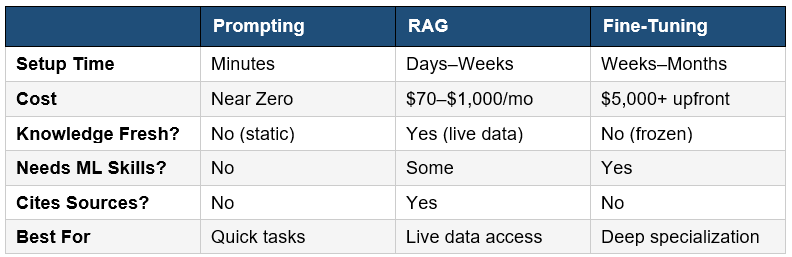
The expert consensus is clear: start with prompting, escalate to RAG when you need live data, reach for fine-tuning only when you need durable behavioral changes that prompts and RAG cannot reliably achieve.
Before & After: How Prompting Changes Everything
This is the single most important section in this post. I'm going to show you the same request at three quality levels — generic input, improved prompt, and expert prompt — so you can see exactly how output quality scales with prompt quality.
Use Case: Blog Introduction Paragraph
Scenario: You need to write the
opening paragraph for a blog post about remote work productivity.
GENERIC AI OUTPUT (no prompt)
Request:
"Write an intro for a blog about remote work productivity"
Output:
"Remote work has become increasingly popular in recent years. Many companies have adopted flexible work policies that allow employees to work from home. In this article, we will explore some tips and tricks for staying productive while working remotely. These strategies can help you manage your time better and achieve a better work-life balance."
Why it's generic: Cliche opening. Banned phrase 'In this article, we will explore.' No hook, no specificity, no voice. Every AI produces this.
GOOD PROMPT OUTPUT
Prompt:
You are a productivity writer for knowledge workers. Write a 60-word blog intro for "Remote Work Productivity in 2026." Open with a specific stat or surprising claim. Use second person. No "In this article" constructions. Punchy sentences only.
Output:
"The average remote worker loses 2.5 hours daily to context switching — more than they ever lost in an open office. Your commute time returned. Your meeting load did not. This guide gives you five systems that actually fix that, built for 2026 workflows where AI is doing half the work already."
Why it's
better: Specific stat, strong hook, second person voice, punchy rhythm. Same model, completely different output. The only variable was the prompt.
This is the core lesson of prompt engineering: the model hasn't changed. Your instructions have. You can check our Prompt Library (400+ Free Templates) for copy-paste versions across 40+ use cases.
How to Choose: Decision Table
Print this. Paste it in your team Notion. Refer to it before spinning up any AI infrastructure.
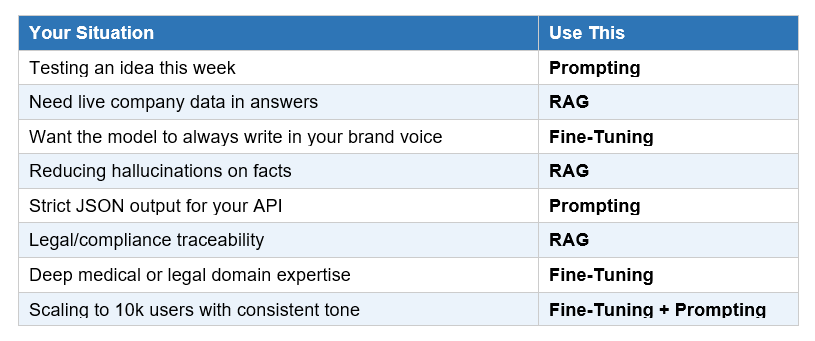
Contrarian take: The 'hybrid is best' advice you'll read everywhere is true in theory and paralyzing in practice. Start with the cheapest option. Ship it. Then add the next layer only when you hit a wall you can clearly describe.
Prompt Glossary: 10 Terms You Need to Know
I built this glossary for two reasons.
First, these terms appear constantly in AI documentation and most definitions are written by engineers, for engineers.
Second, this is exactly the kind of reference content that gets cited in AI search results — so it helps the post and it helps you.
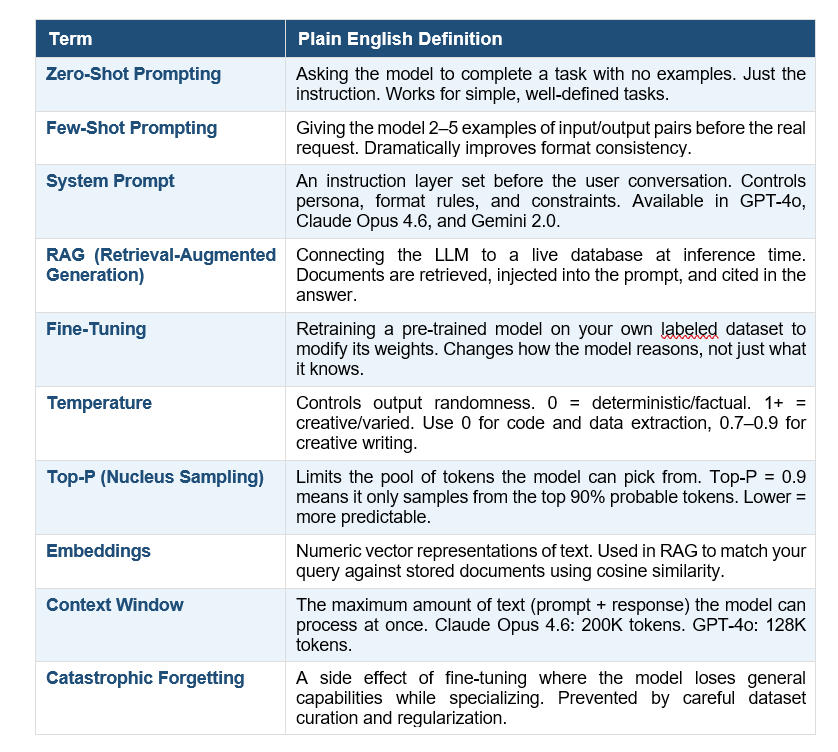
For deeper dives on each technique, check out the What is Prompt Engineering? and What is a System Prompt? knowledge guides.
Recommended Blogs
If you found this useful, these posts go deeper on related topics:
• Best Claude AI Prompts 2026: 25+ Types With Examples
• Best ChatGPT Prompts 2026: 200+ With Real Examples
• Best Gemini AI Prompts 2026: 100+ Templates With Examples
• What is a System Prompt?
• The Guide to Agentic Prompts
Frequently Asked Questions
What is the difference between prompting and fine-tuning?
Prompting changes the instructions you send to a model at runtime — no model modification required. Fine-tuning changes the model's actual weights through additional training on your dataset, permanently altering how it reasons and responds. Prompting is free and instant; fine-tuning costs $5,000+ and takes weeks.
When should I use RAG instead of fine-tuning?
Use RAG when answers require access to live, changing, or proprietary data — and when source citations matter. Use fine-tuning when the model needs to reason differently (apply your decision framework, use specific jargon consistently) and your data is stable. RAG is reversible in minutes; fine-tuning is not.
Can I combine prompting, RAG, and fine-tuning?
Yes, and the best production systems do. A common stack: a fine-tuned base model (for consistent tone and decision logic) + RAG (for live data retrieval) + a system prompt (for per-request formatting and guardrails). Build in this order: prompting first, RAG second, fine-tuning only when both fall short.
How much does fine-tuning an LLM cost in 2026?
Budget $5,000–$20,000+ for a serious fine-tuning project, covering dataset curation, compute, evaluation, and deployment. OpenAI's fine-tuning API starts at around $8/1M tokens for training GPT-4o-mini. The ongoing inference cost for fine-tuned models is typically 2–6x higher than base models due to dedicated compute.
What is zero-shot prompting vs few-shot prompting?
Zero-shot prompting asks the model to complete a task with no examples — just the instruction. Few-shot prompting includes 2–5 input/output examples before the real task. Few-shot consistently outperforms zero-shot on tasks requiring specific format or style, because the examples remove ambiguity about what 'correct' looks like.
Does RAG reduce AI hallucinations?
Significantly, yes. Internal analysis of enterprise AI systems shows that optimizing RAG retrieval pipelines can reduce hallucination rates by up to 85% compared to baseline models, since every answer is grounded in retrieved documents rather than model weights. Crucially, RAG also provides source citations — which hallucinations cannot.
What is the context window and why does it matter for prompting?
The context window is the total amount of text (prompt + response) a model can process in one request. Claude Opus 4.6 handles 200K tokens; GPT-4o handles 128K tokens. A larger context window means you can often skip RAG entirely for moderate-sized knowledge bases by pasting documents directly into the prompt.
Which technique is best for beginners?
Prompt engineering. Always start here. It requires no ML knowledge, no infrastructure, no budget, and produces results in minutes. Master zero-shot and few-shot prompting, learn to write effective system prompts, and you'll solve 80% of real-world AI problems before needing anything else.
CTA
Follow along at promptailearning.com for weekly guides on prompting, AI tools, and getting more from every model. And grab the free prompt library (400+ templates) while you're there.